


Other tools replay a chart. TradingSim replays the trading day.
The scanner, the order book, the tape and your fills, all moving on one clock through a real market session. Practice the whole job of trading, then review every decision you made.
Trading is a whole day of decisions. Most practice tools cover one.
A replay chart over here, a paper account over there, a journal you fill in afterward. TradingSim is the only place we know of where every step of the day happens together, in the order it happens.
Any session, any hour
Choose a day in your plan's history and play it tick by tick, from 0.5× to 10×.
Broker paper accounts only run while the market is open.
Scan that morning
The scanner ranks what was moving at the minute on the clock, never later.
Live scanners can't go back to a past day.
Every print, replayed
Time & Sales and Level 2 advance print by print with the chart.
Chart-replay tools replay candles only.
Fills that feel real
Fills from the bid and ask, limits filled by real prints, your fees taken out.
Bar-based replay fills at the candle.
Already in your journal

Every trade is logged automatically and replayable bar by bar.
Journals need your trades imported first.
World-class replay. The whole market, at the speed you think.
Most replay tools step through candles. TradingSim replays every print, with the chart, Level 2, the tape and the scanner on one clock. Play tick by tick, fast-forward through a slow lunch, rewind a missed entry, or jump to the close in a click. At 9:31 you see only what traders saw at 9:31.

Pick the session you want to practice
Choose any market day in your plan's history and it loads exactly as it traded.
- Stocks skip weekends, crypto trades Saturdays, futures skip Sundays.
- Extended hours for stocks from 4 AM to 8 PM ET.
- The Globex day for futures and a 24-hour UTC session for crypto.
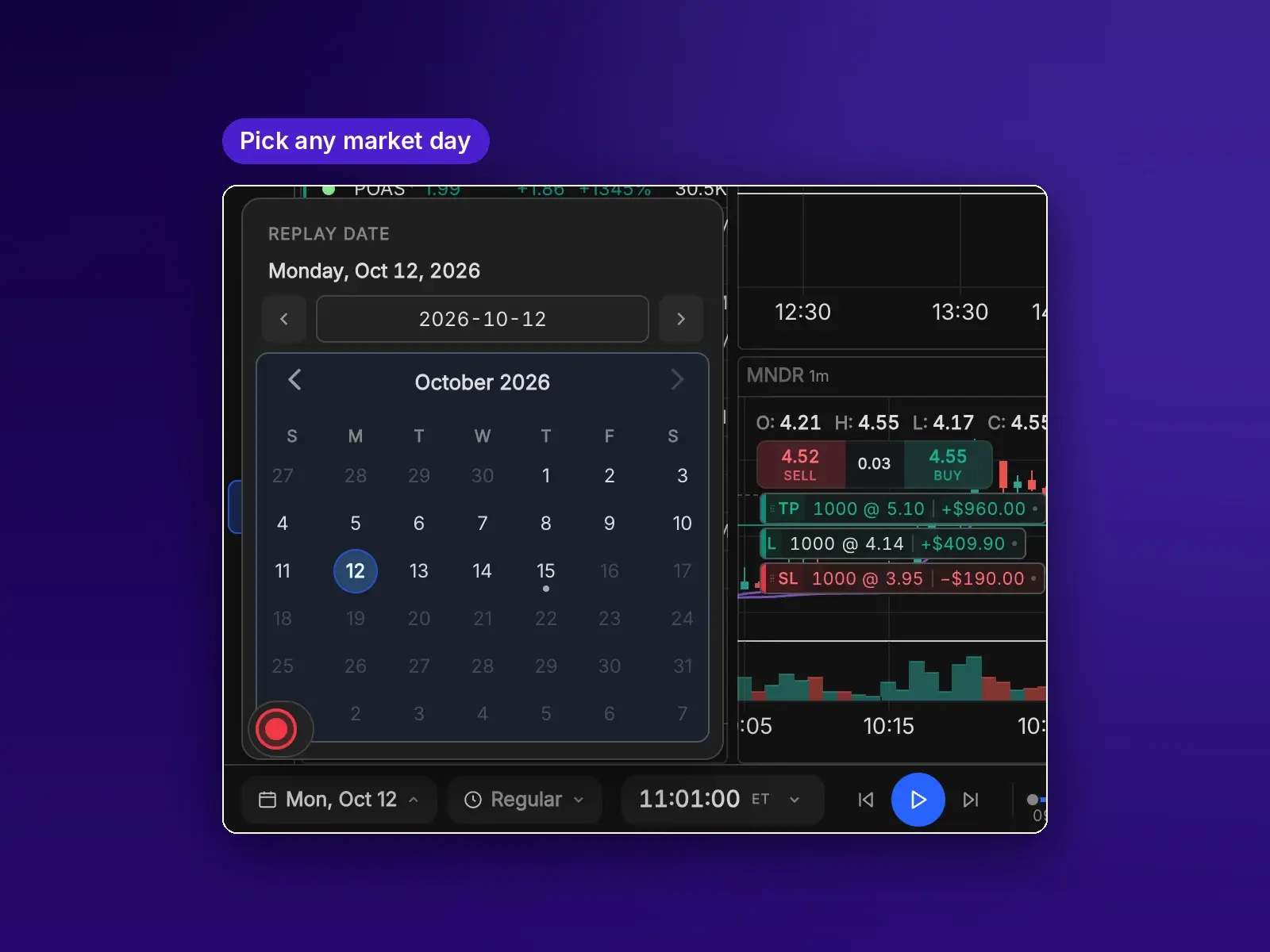

Click a fill, land on that trade
Every fill is marked on the replay bar. Hover one to see the trades there, click it, and the whole workspace jumps to that symbol and that second.
- Hover a marker to see each fill: symbol, side and time.
- Click to load that symbol on every linked chart, Level 2 and the tape.
- Move between your trades for the day without leaving the session.
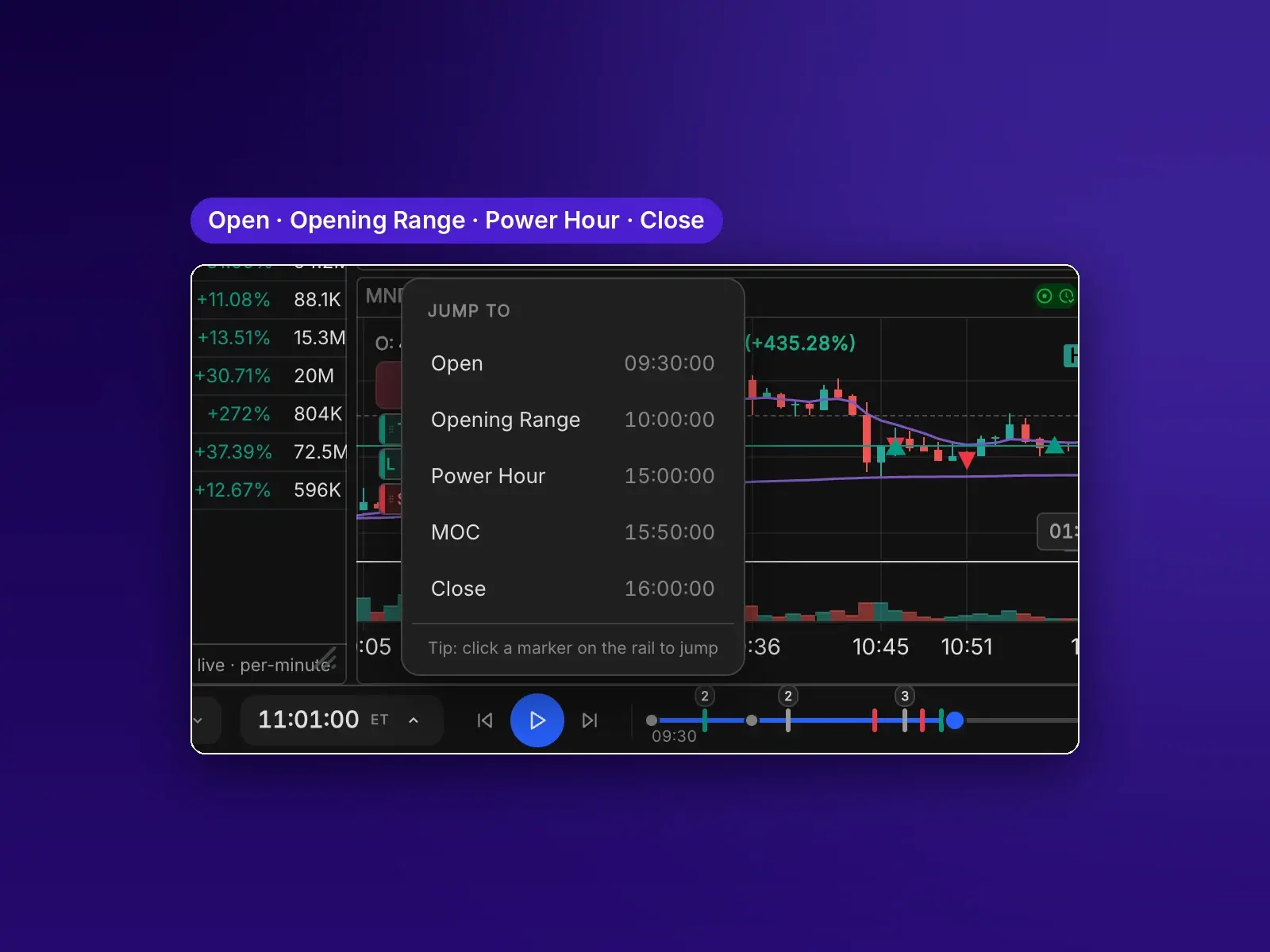
Go straight to the part of the day that matters
Skip the slow stretches and land where the action is.
- Open, Opening Range, Power Hour, MOC and Close.
- Futures: London open, 8:30 economic data and settlement.
- Or type any time into the clock.
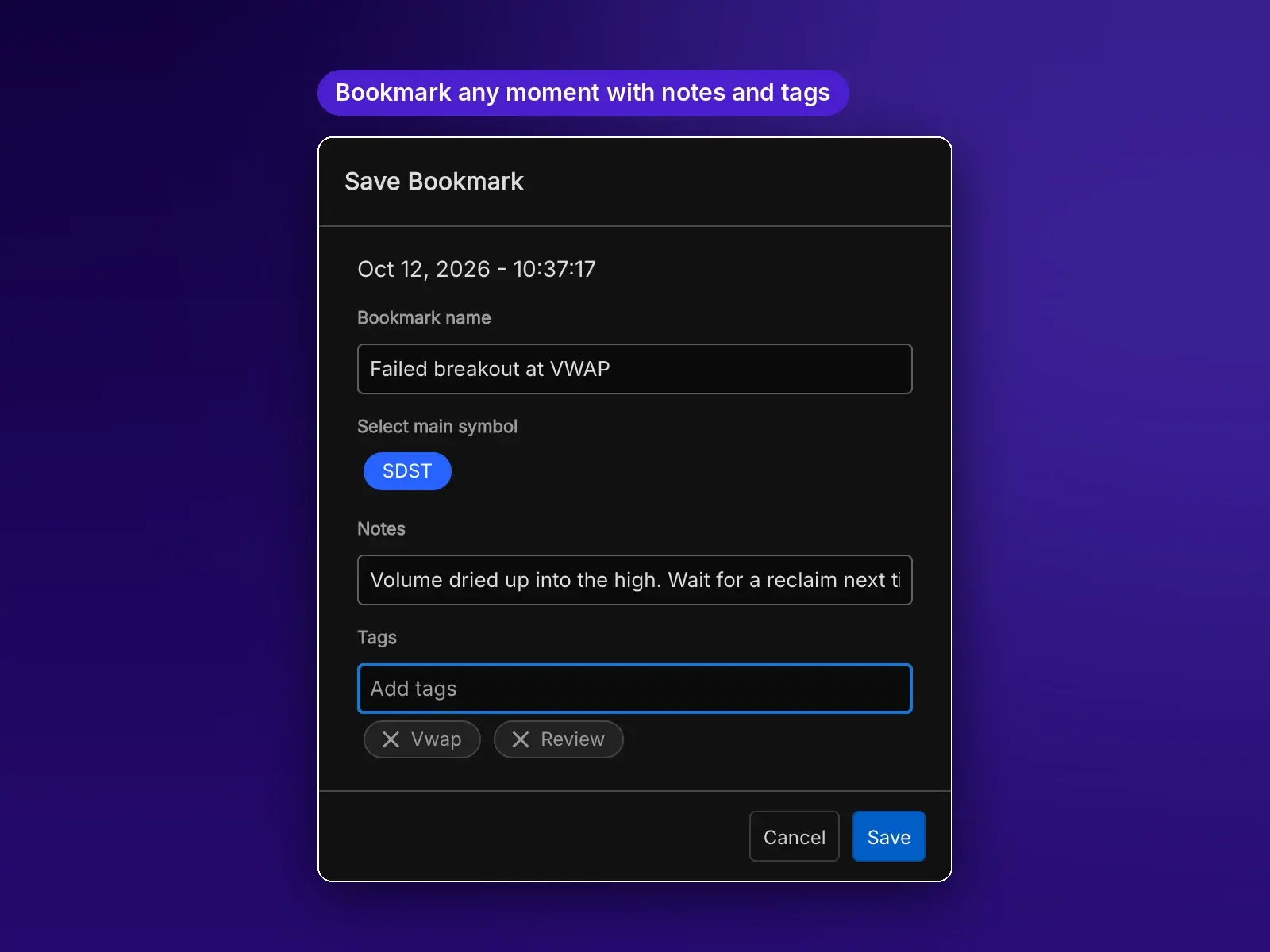
Bookmark the moments worth studying
Save any second of a session with a name, notes and tags, then come back to it in one click.
- Name it, note what you saw, and tag it by setup.
- Filter your bookmarks to find a pattern across days.
- Jump straight back to that symbol and that second.
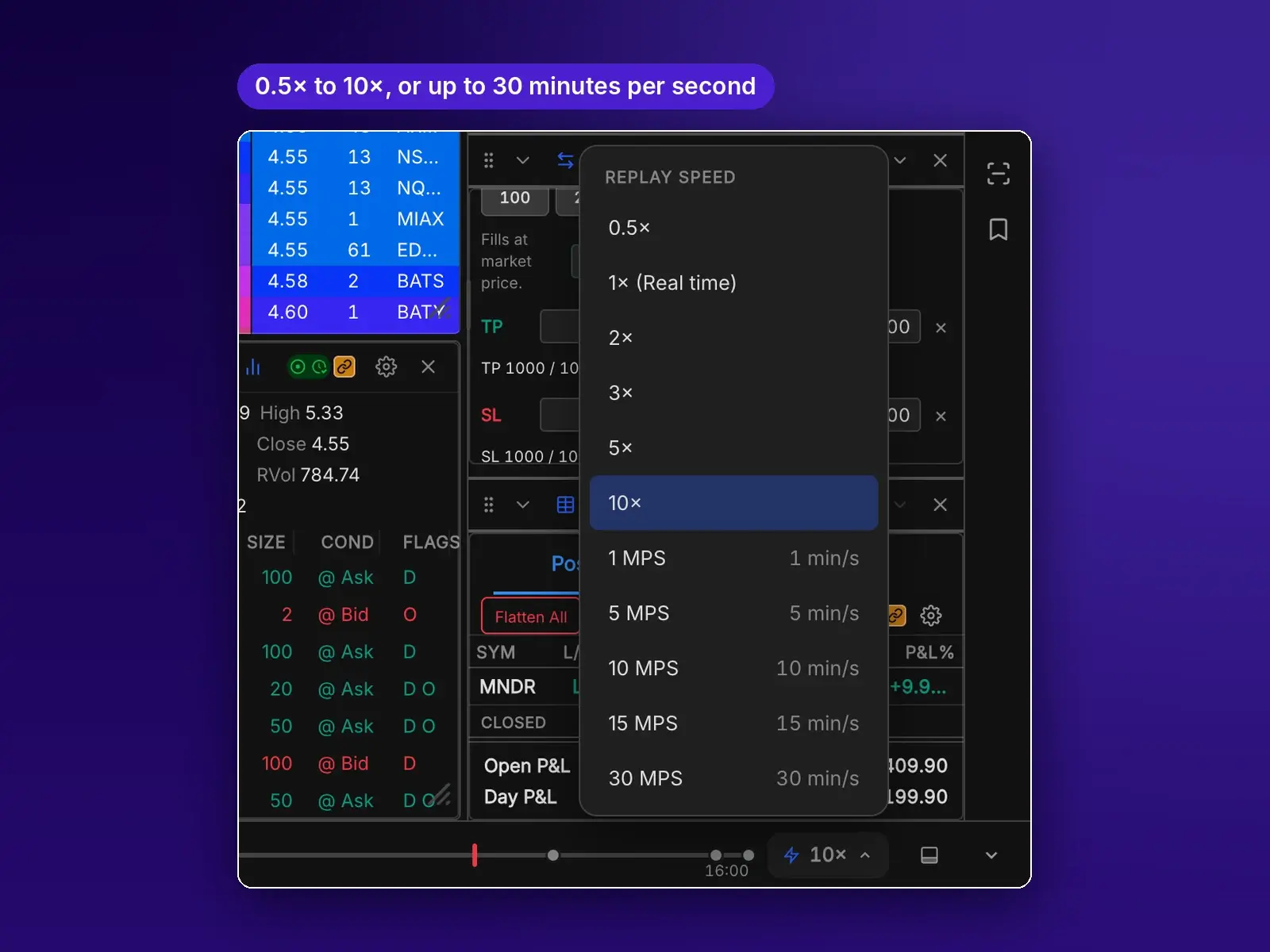
Slow down for the open, speed through lunch
Play tick by tick or fast-forward, and trade at any speed.
- Tick-by-tick playback at 0.5×, 1×, 2×, 3×, 5× or 10×.
- Fast-forward 1 to 30 minutes per second, building the same candles as normal play.
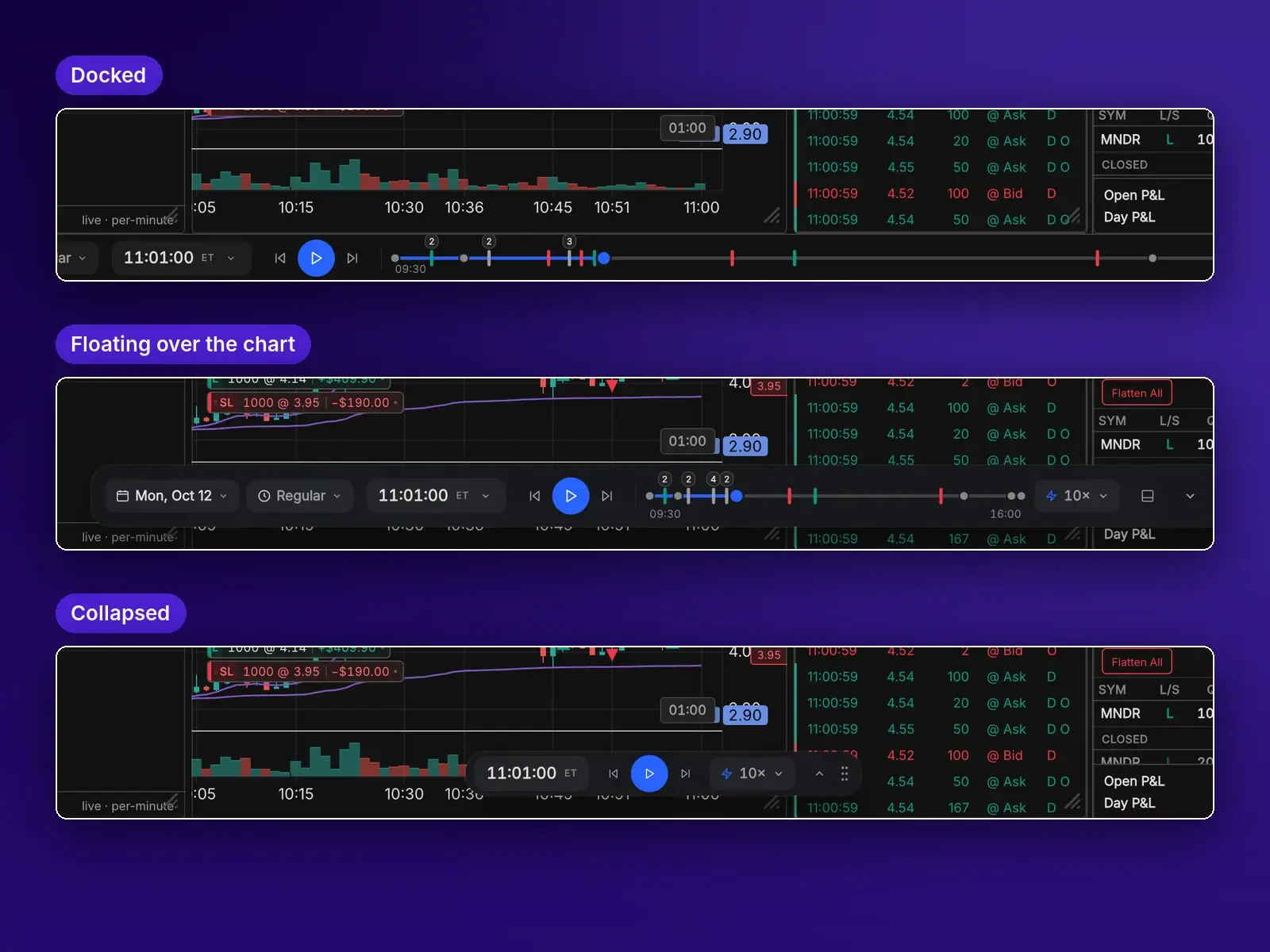
Controls where you want them
Dock the replay bar, float it over your chart, or shrink it to a pill.
- Every fill is marked on the timeline. Click one to jump back to that trade.
- Rewind by timeline, step, date, jump or bookmark.
- Open a second window to replay another day side by side.
Every order type. Four ways to place it. All context-aware.
No other simulator we've reviewed makes practice this close to real trading. Hotkeys, the chart, a right-click or the ticket: use whichever fits the moment. Each one reads where price is and what you hold, so a click above the market offers a stop and a click below offers a limit. Fills come from the bid, ask and real prints, with your fees taken out.
Every order type a day trader uses
Each one fills the way it would at a broker: market orders at the bid or ask, resting orders only when real prints reach them.
Market
Fills right now at the best bid or ask.
Limit
Waits for the tape to reach your price, or better.
Stop
Triggers when price trades through your level.
One-cancels-other
Two orders at once. When one fills, the other cancels.
Bracket
An entry with a take-profit and stop-loss attached, each showing its dollar P&L.
Reverse, close, cancel
Flip a position, close one symbol or everything, cancel orders, or move your stop to breakeven.
Trade at the speed of a keystroke
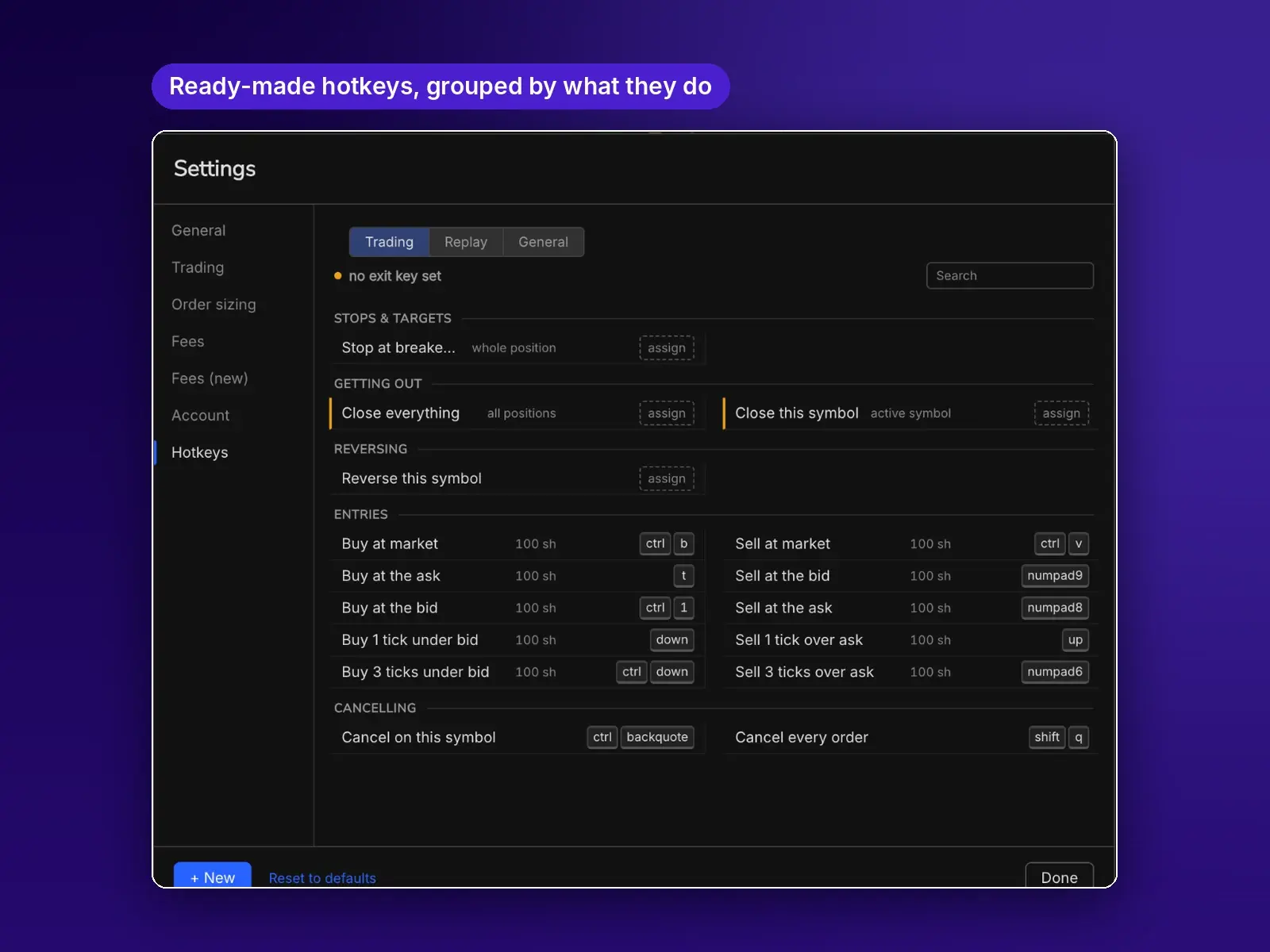
Start with a ready-made set, or build your own and read back exactly what each key will do.
- Entries at market, at the bid or ask, or any number of ticks away.
- Exits that close one symbol or everything, reverse a position, or move your stop to breakeven.
- Cancel orders on one symbol or all of them.
- Separate key sets for trading, replay controls and general actions.
Pick the way you place it
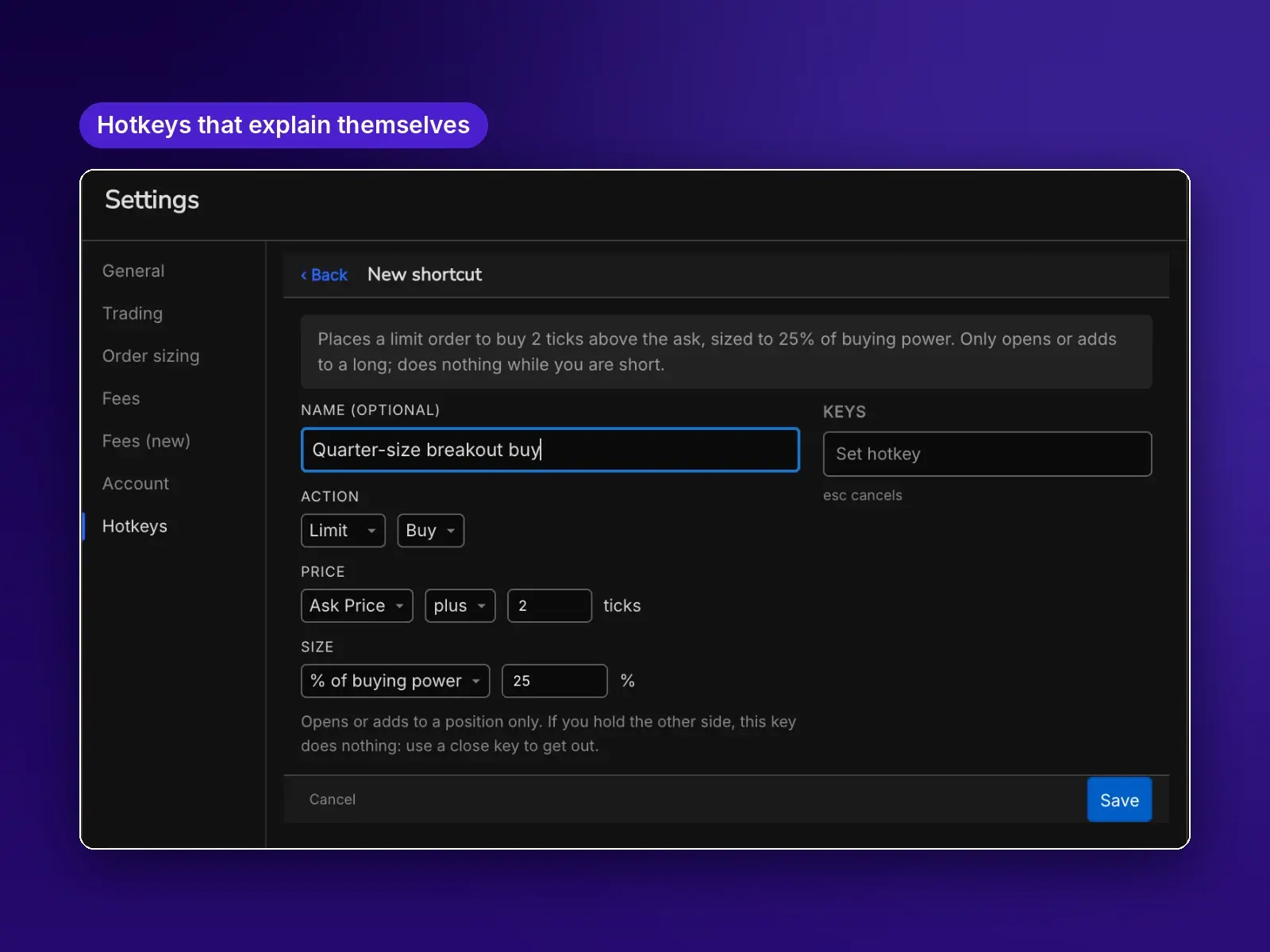
Hotkeys that explain themselves
Build a key from plain choices, then read back exactly what it will do.
- Market, limit, stop-loss, profit target, close, cancel and reverse.
- Price from the bid, ask or last, plus or minus any number of ticks.
- Size from the top bar, or its own shares, dollars, % of buying power or max affordable.
- Opening keys never flip you: if you hold the other side, they do nothing until you close.
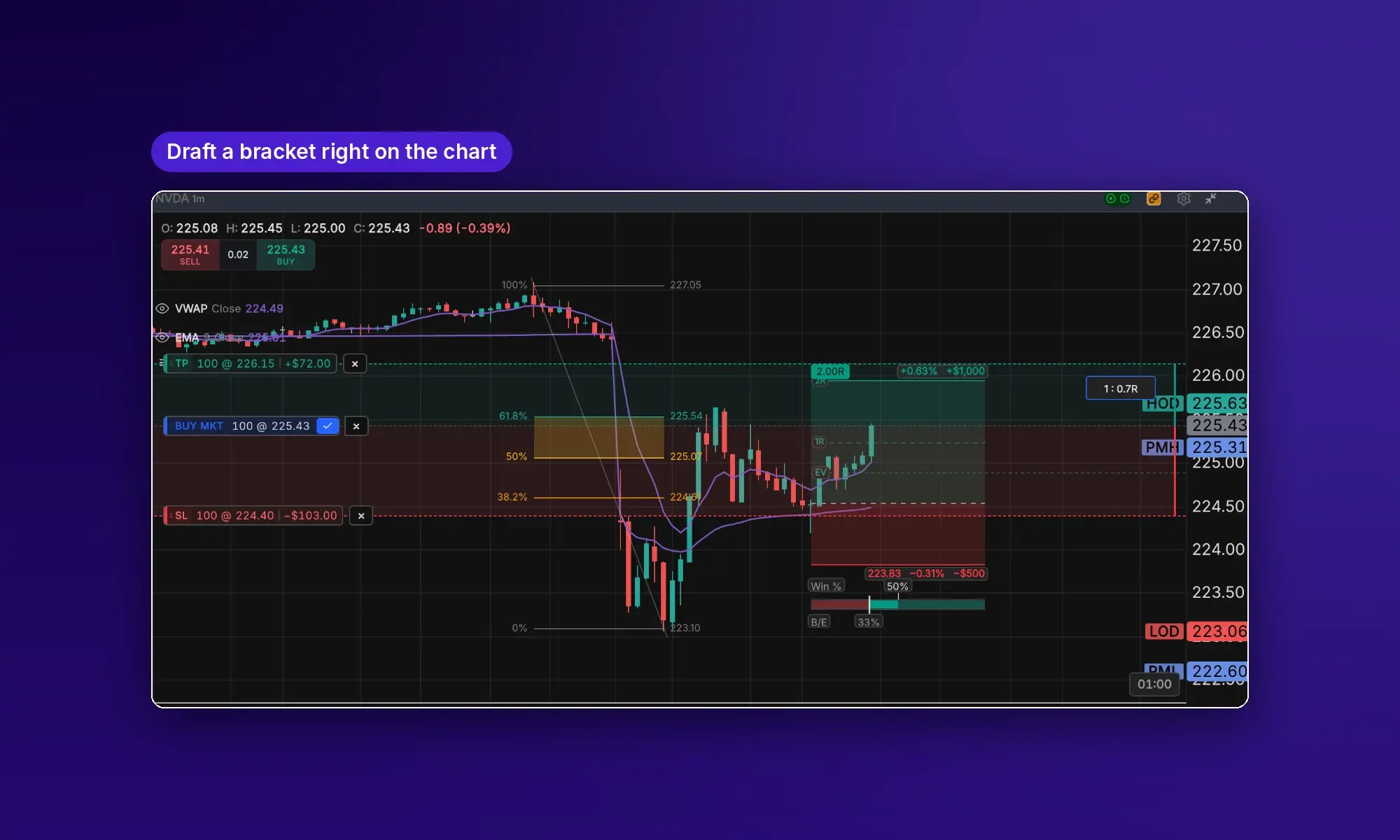
Arm it on the chart, then confirm
BUY and SELL stage the order on the chart before anything is sent.
- Add a take-profit and a stop and see each leg's dollar P&L.
- Reward-to-risk updates as you drag the legs.
- Type an exact price into any leg.
- Once filled, the stop and target stay on the chart to manage.
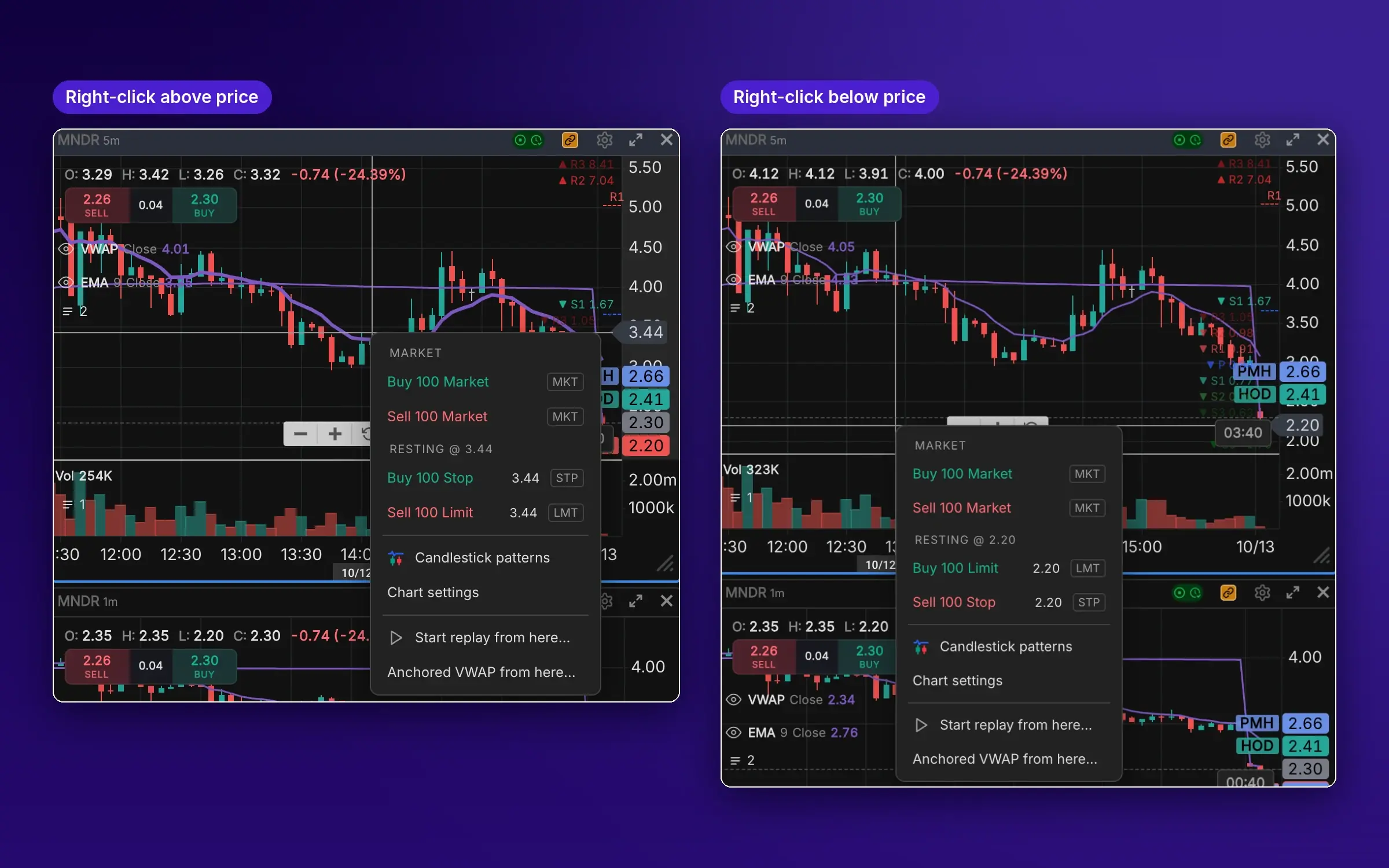
Right-click a price. The menu knows where you clicked.
Resting orders match the side of the market you clicked.
- Above the market: Buy Stop or Sell Limit at that price.
- Below the market: Buy Limit or Sell Stop.
- Market buy or sell at the top, sized from your quantity.
- Start a replay or an anchored VWAP from that bar.
Every detail, when you want it
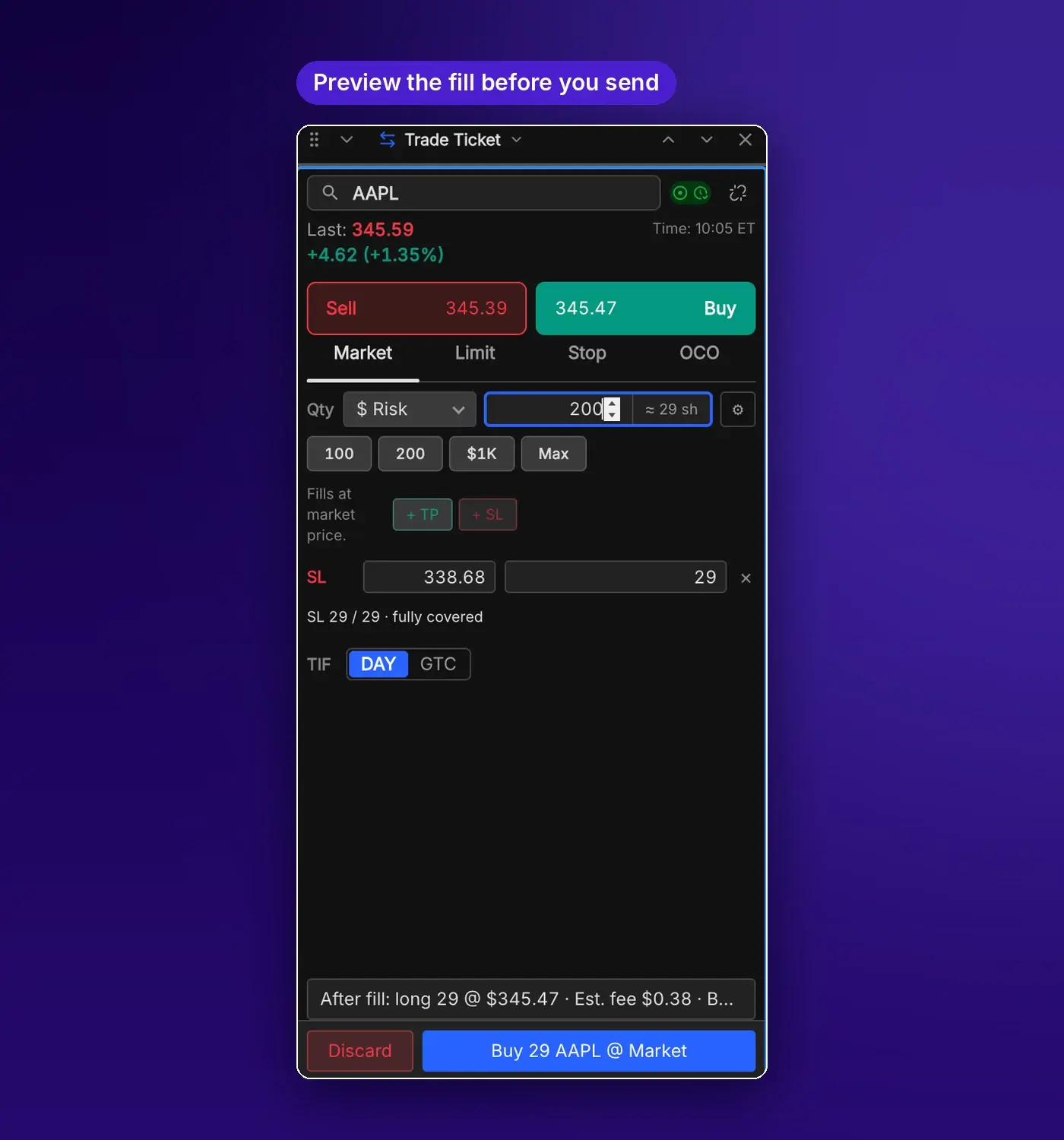
The full ticket for planned entries.
- Market, Limit, Stop and OCO.
- Stop-loss and take-profit legs with a coverage check.
- DAY or GTC.
- A preview of the fill: your position, the estimated fee and buying power afterward.
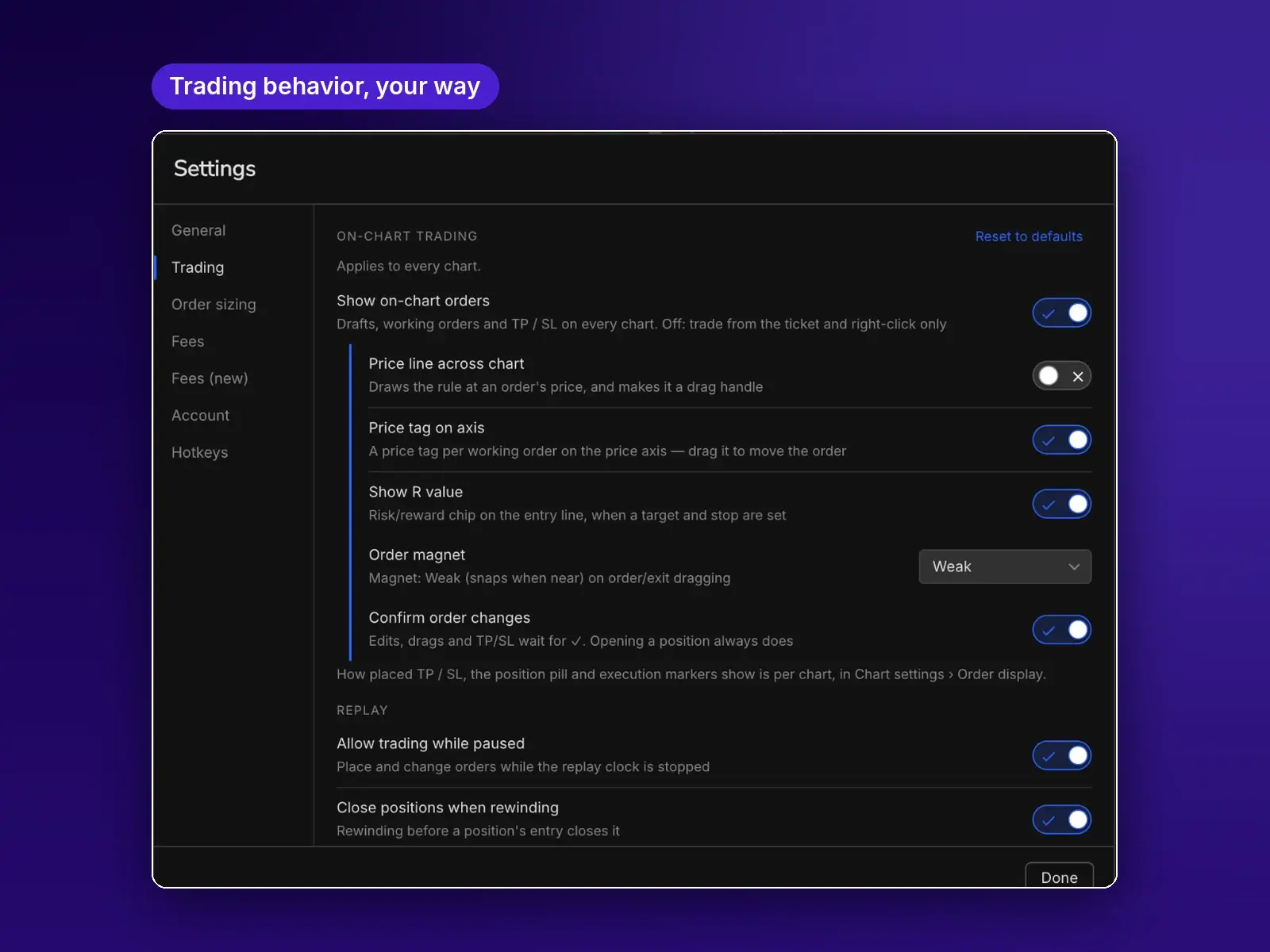
Trading behavior, your way
Decide how orders show up and behave.
- On-chart orders, price line and price tags on the axis.
- Show R on positions and snap orders to key prices with Order Magnet.
- Confirm changes, trade while paused, and close positions when you rewind.
Size every order the way you think about risk.
Most simulators ask for a share count. TradingSim lets you size by shares, dollars, % of buying power, dollars at risk, percent risk or the most you can afford, and converts it to shares before you send.
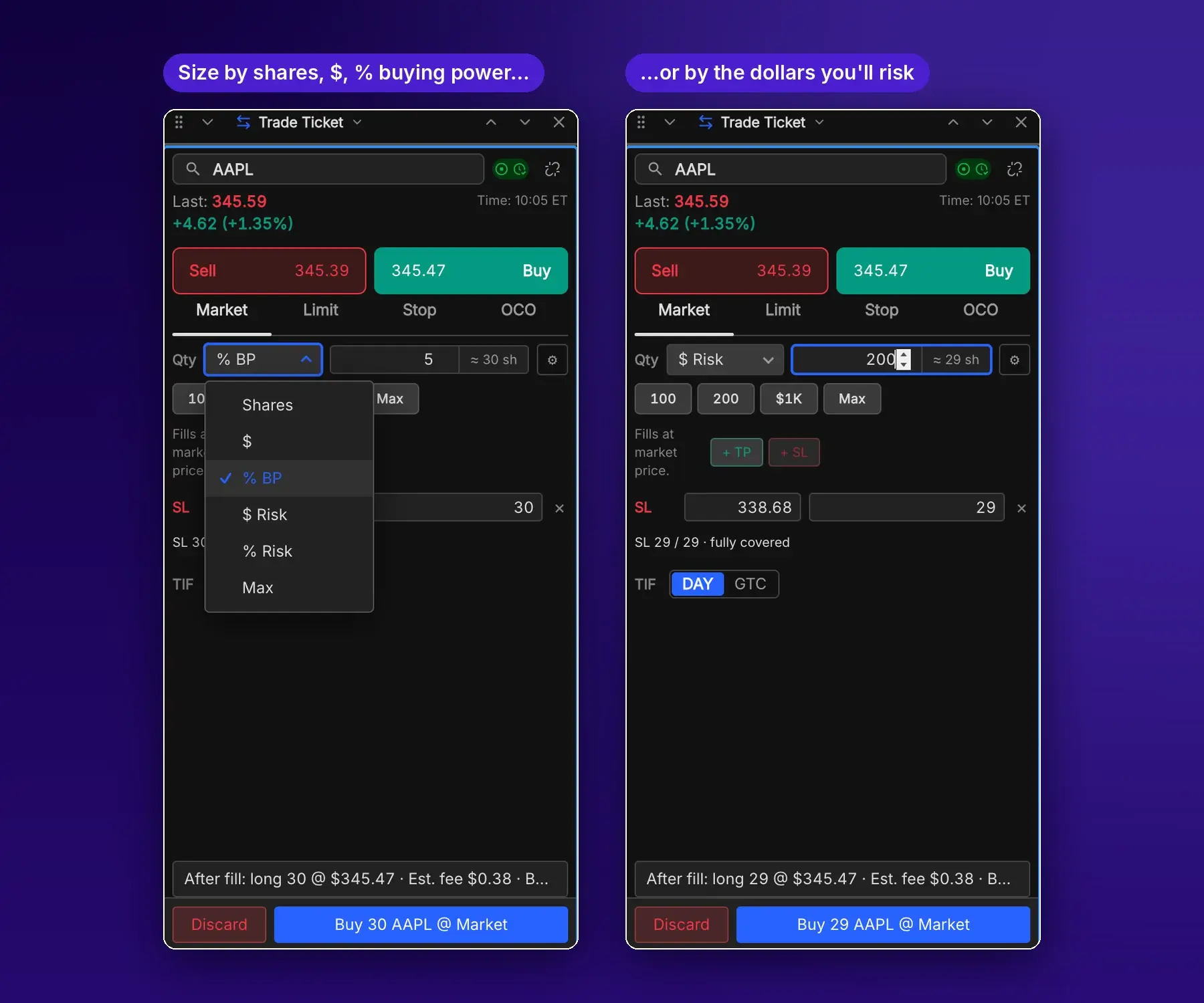
- Six sizing modes on the ticket: Shares, $, % BP, $ Risk, % Risk and Max.
- Risk modes switch on once you set a stop, so size comes from the distance to it. $200 of risk with a stop at 338.68 becomes 29 shares.
- The share count shows beside every entry before you send.
- Hotkeys carry their own size, or follow the top bar.
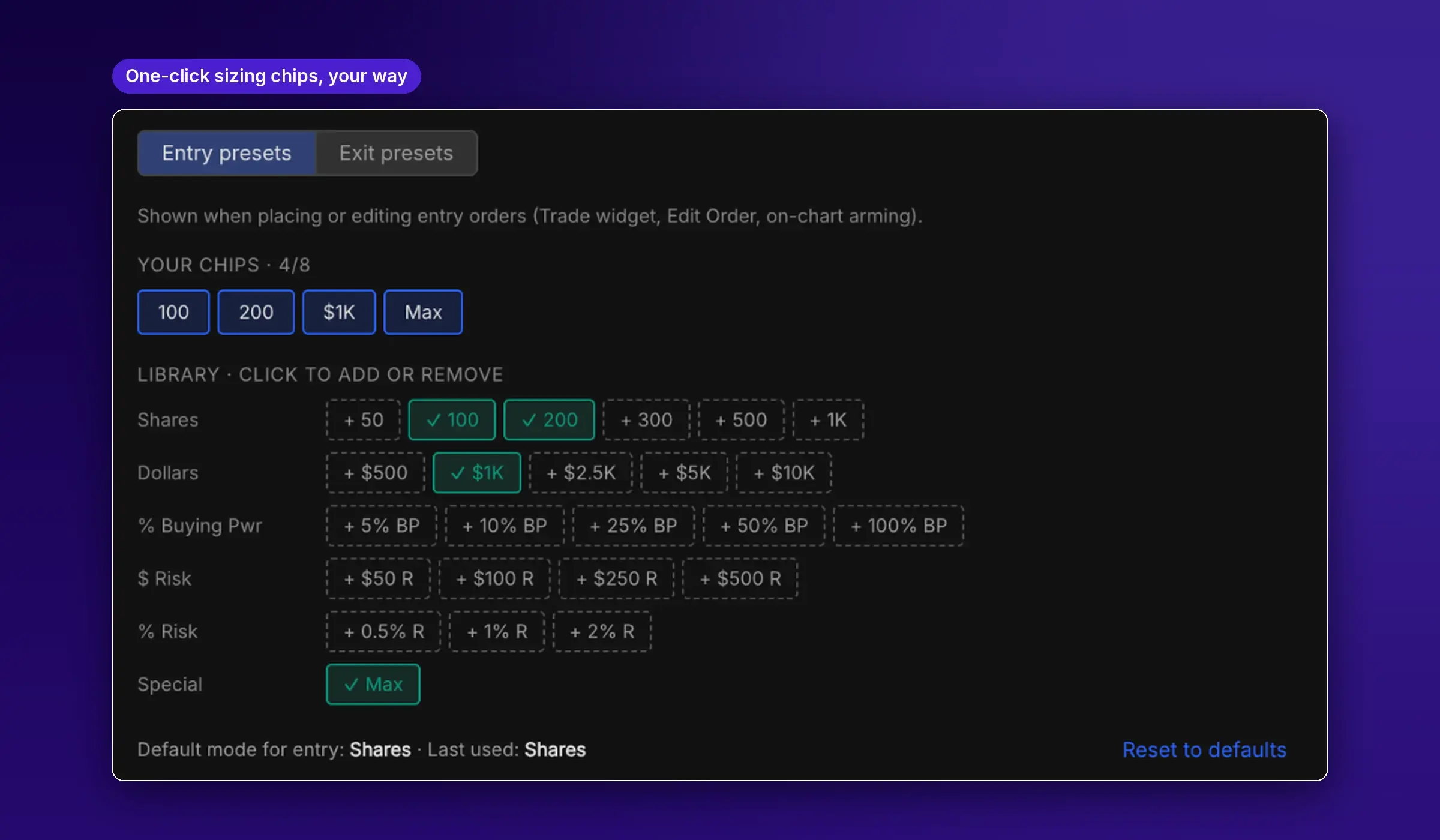
- Choose up to 8 one-click sizing chips from a library of shares, dollars, % of buying power, $ risk and % risk.
- Separate chips for exits: close a quarter, a third, half, three quarters or all of a position, or a set number of shares.
- Set the default mode for entries; the last one you used is remembered.
Find the trade the way you would have that morning.
A scanner that knows how the day ends teaches the wrong lesson. Ours only knows what had happened by the minute on the replay clock.

- Presets ready to run: Premarket Gap Up, Top Gain %, Top Volume, Top Loss and more.
- Filter by premarket gap and volume, price, index, sector, float and short interest.
- Results re-rank every minute in step with the replay.
- Click a result and every linked chart, Level 2 and Time & Sales follows.
- Included on every plan.
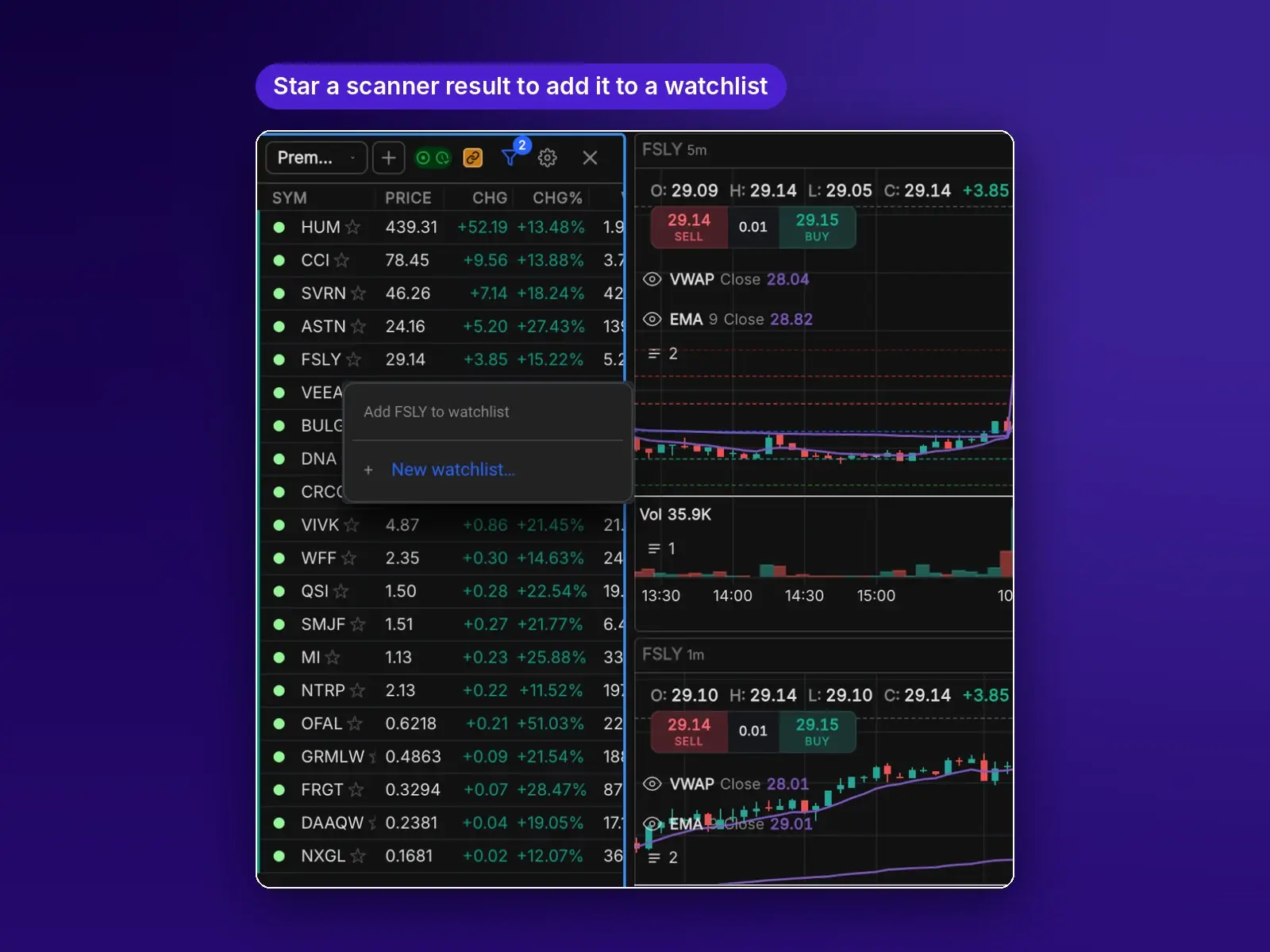
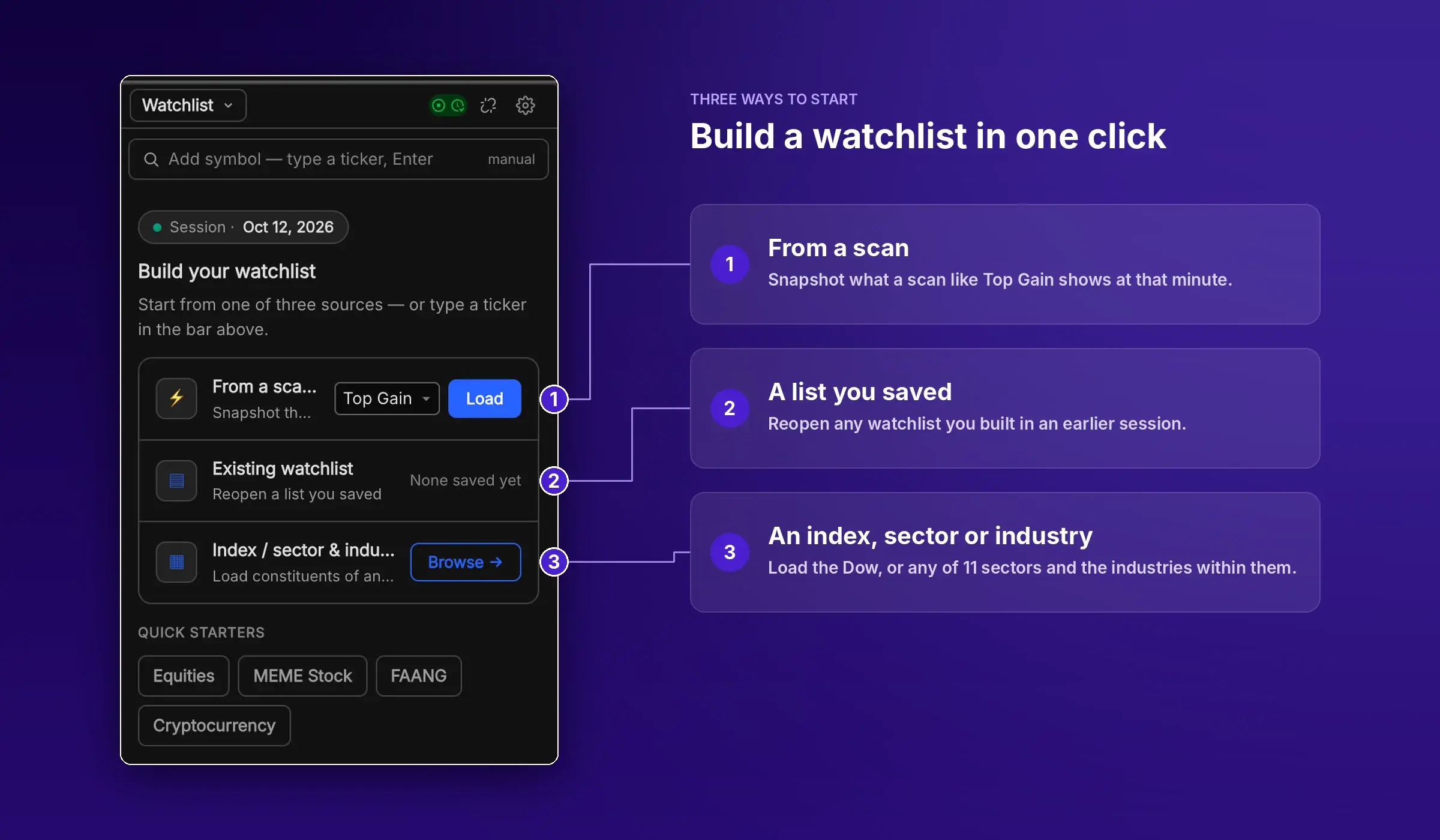
From scan to watchlist in one click
Star any scanner result to drop it into a watchlist, or start a new list on the spot.
- Load a whole scan as a watchlist snapshot, like Top Gain at that minute.
- Build a list from an index, such as the Dow Jones Industrial Average.
- Or from any of 11 sectors and the industries within them, such as Technology → Semiconductors.
- Quick starters for Equities, Meme Stocks, FAANG and Crypto.
- Save lists and reopen them in any session.
Your tape, set up the way you read it.
Level 2 and Time & Sales are where a day trader's eyes live. Every column, filter, color and metric is yours to set, and your setup follows you to any computer.
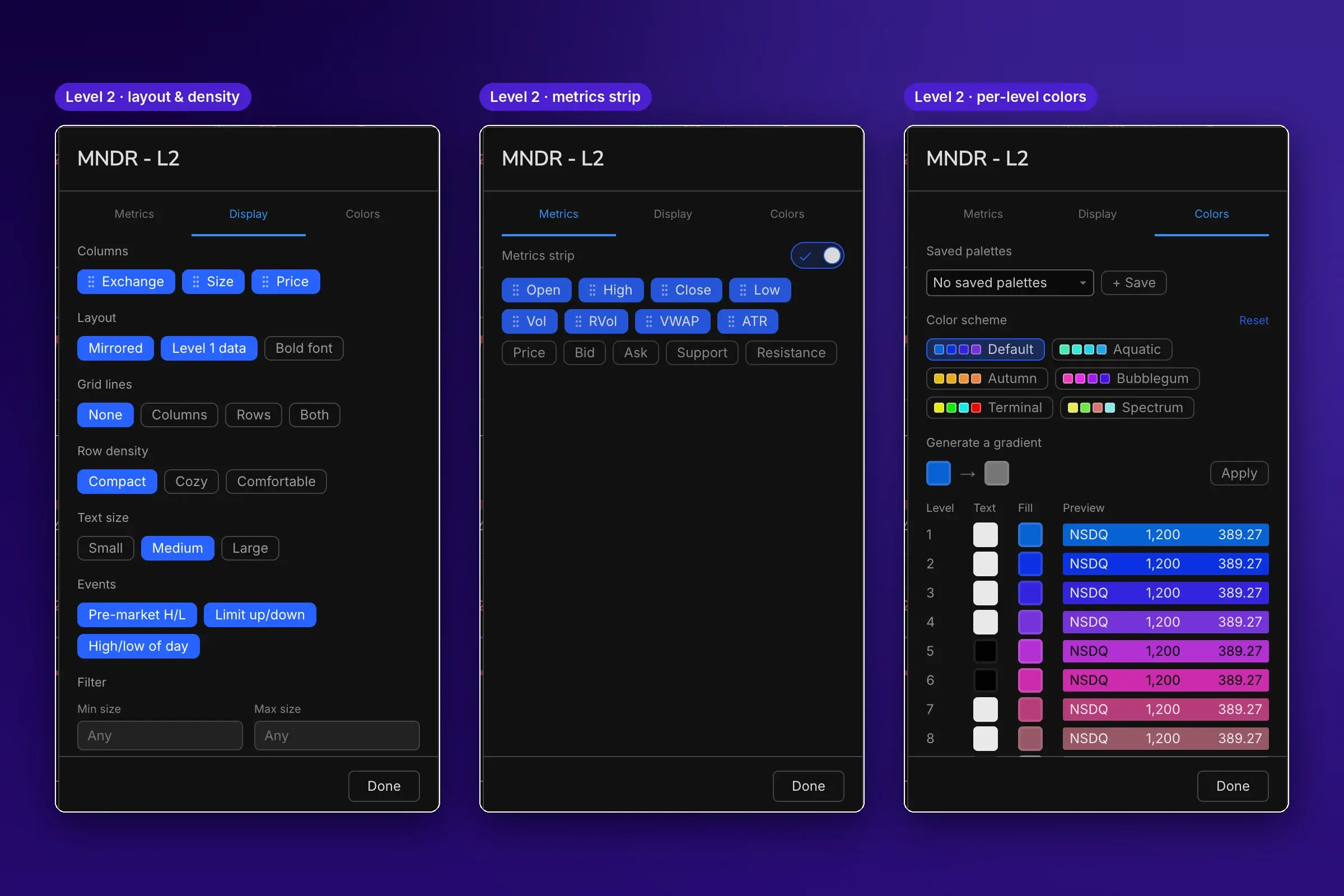
Level 2, built around how you read the book
Columns, layout, colors and metrics, all your choice.
- Drag Exchange, Size and Price into any order; mirrored or stacked.
- Mark premarket high and low, limit up/down and high/low of day inside the book.
- Hide small or huge orders with min and max size filters.
- Six color schemes, a gradient generator or your own color for every level. Save palettes.
- A metrics strip with OHLC, volume, RVol, VWAP, ATR, support and resistance.
A tape that shows the prints you care about
Decide what's on the tape and how each print looks.
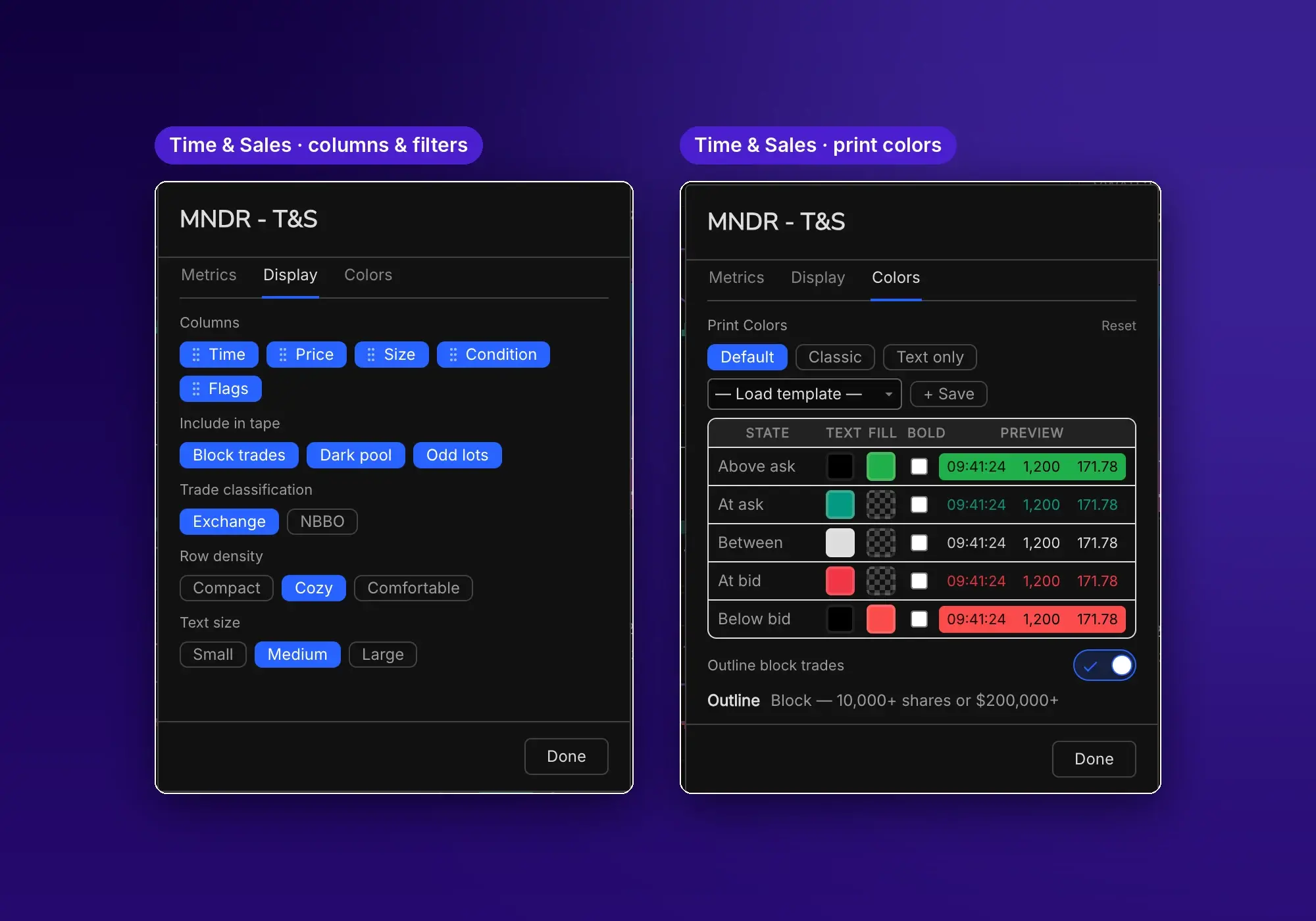
- Time, price, size, condition and flags, in any order.
- Include or hide block trades, dark pool prints and odd lots.
- Classify prints by exchange or by NBBO.
- Color prints above the ask, at the ask, between, at the bid and below the bid. Save templates.
- Outline block trades of 10,000+ shares or $200,000+.
The most realistic fee and margin model in any replay simulator.
Beta · new execution engineNo other replay tool we've reviewed models trading costs like this: tiered per-share commissions with minimums and caps, exchange take fees and rebates, SEC and FINRA fees on every sale, crypto maker/taker tiers, futures fees by contract, plus leverage and margin calls. Start simple with no fees, or match your own broker or prop firm number for number.
Commissions modeled on real brokers
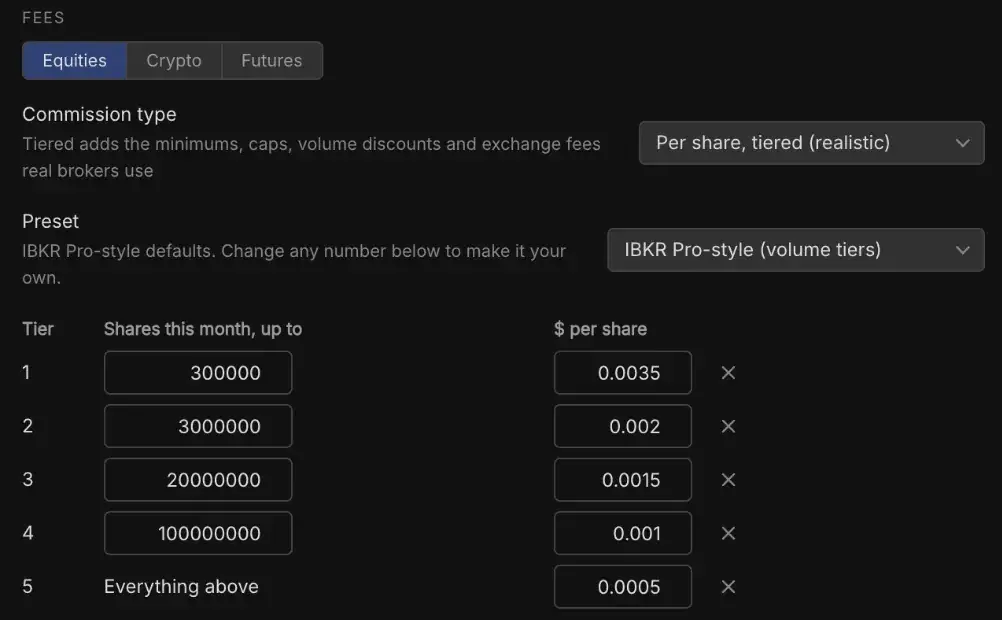
Per-share pricing with volume tiers, the way IBKR Pro charges.
- An IBKR Pro-style preset with five volume tiers, from $0.0035 down to $0.0005 a share.
- Your tier comes from the shares you've traded this month.
- A $0.35 minimum and a 1% cap per order.
Exchange, clearing and regulatory fees
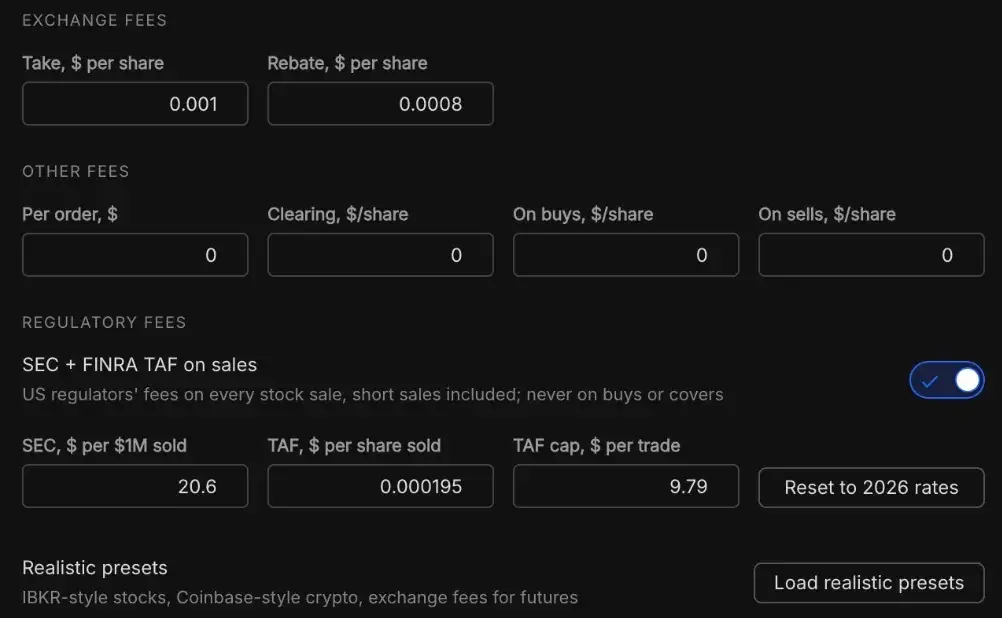
The costs most simulators leave out.
- Exchange take fees and rebates per share.
- Per-order, clearing and per-share buy or sell fees.
- SEC and FINRA TAF on every sale, short sales included, at 2026 rates with the TAF cap.
- One click loads realistic presets for stocks, crypto and futures.
Crypto maker/taker tiers
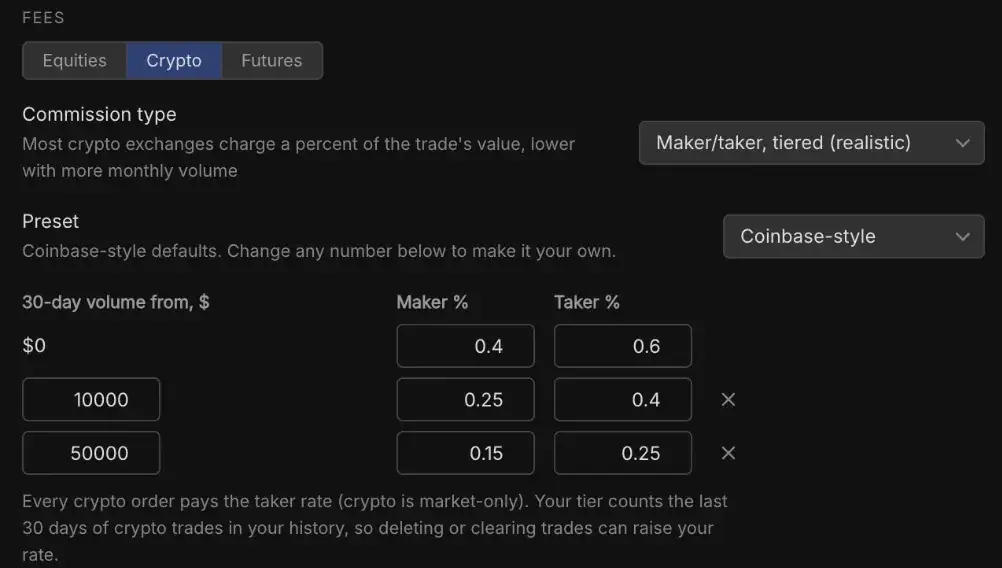
Priced as a percent of the trade, the way crypto exchanges charge.
- A Coinbase-style preset, or set every number yourself.
- Your tier comes from your last 30 days of crypto volume.
- Crypto orders pay the taker rate, since crypto is market-only.
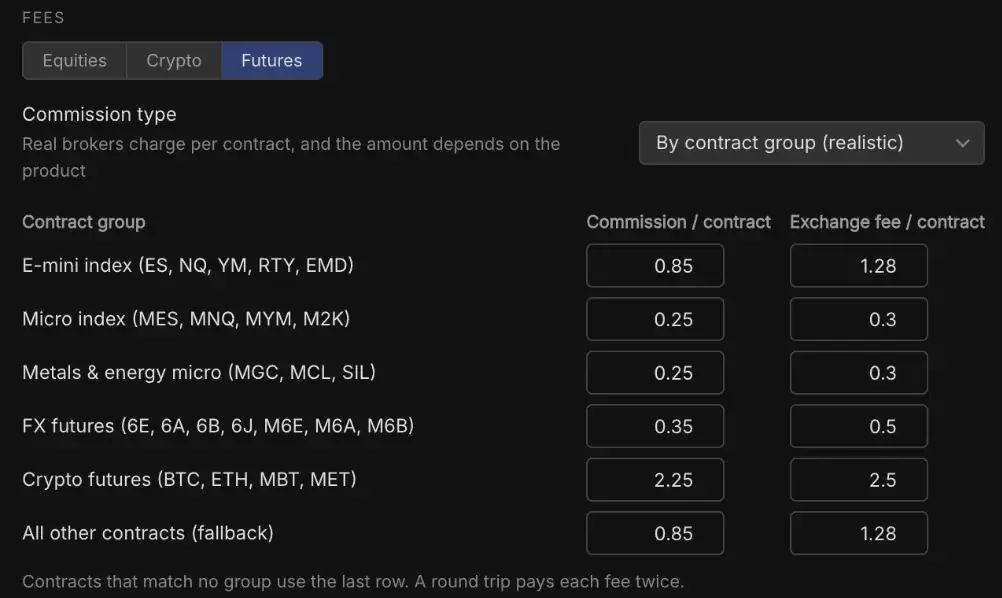
Futures fees by contract
Commission and exchange fee per contract, set by product group.
- E-mini and micro index, metals and energy, FX and crypto futures.
- A fallback row covers any contract outside the groups.
- A round trip pays each fee twice, like a real broker.
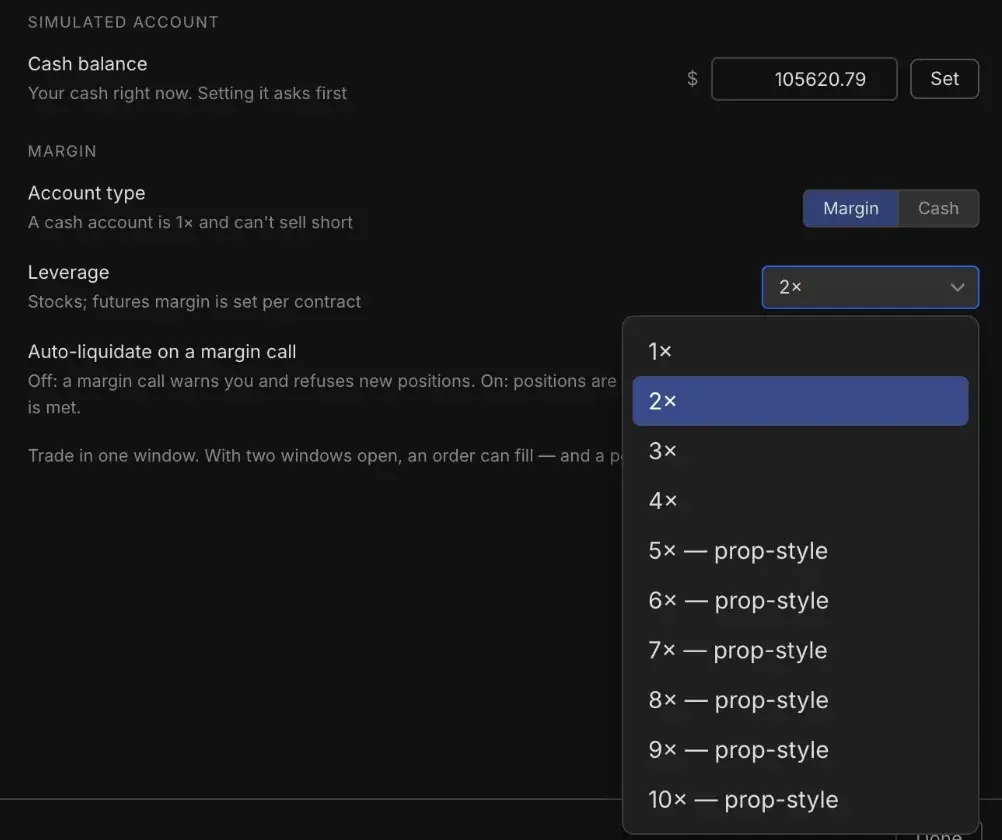
Margin, leverage and margin calls
Trade a cash account or margin, up to prop-style buying power.
- Stock leverage from 1× to 10×, with 5× and up marked prop-style.
- A cash account is 1× and can't sell short.
- Futures use margin per contract.
- On a margin call, new positions are refused, or positions are sold newest first until it's met.
Fee and margin settings shown are part of the new execution engine, currently in beta.
Simple on day one. As deep as you want after that.
Every default works out of the box. Change only what matters to you, and anything you change can go back to default in one click.
Advanced fee and margin settings are part of the new execution engine, currently in beta.
Every trade becomes a lesson.
Your practice trades are journaled the moment you close them. No import, no CSV, no broker sync. Any of them is two clicks from a bar-by-bar replay with the tape beside it.
Every past trade, two clicks away
Open the log, click a trade, and you're watching it again.
- Step between that day's trades from the ticker bar, or move day by day.
- Click a fill on the replay timeline to jump straight back to that trade.
- Filter wins, losses, saved trades or trades that need review.
Watch the trade unfold again

Replay one trade bar by bar on its own clock, apart from your session.
- Bars, prints and fills appear only as the review reaches them. Did you enter at your level, or chase?
- Dock Time & Sales, Level 2 or a higher timeframe beside it.
- See your best and worst moment in the trade, marked on the chart.
Know your numbers
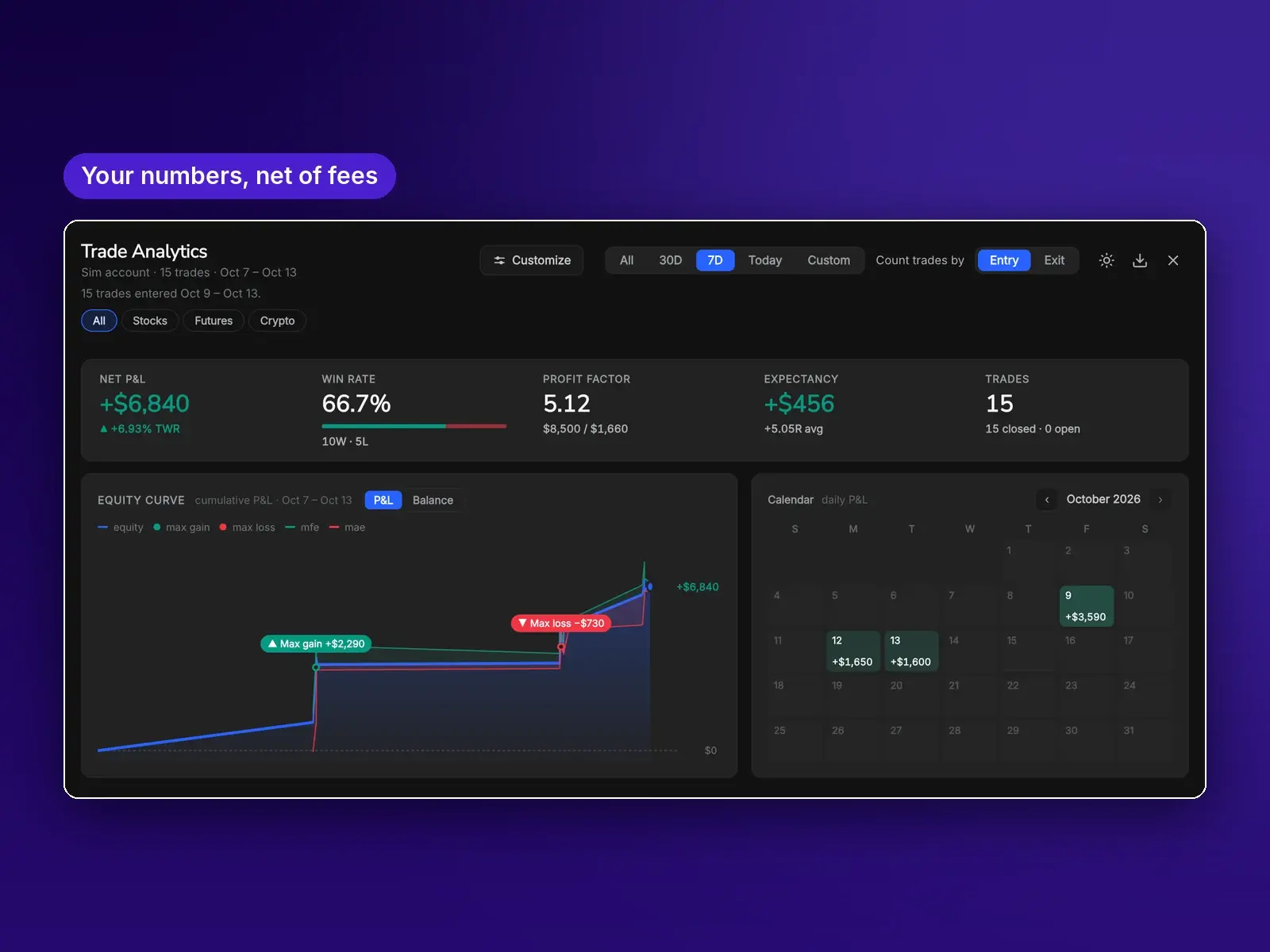
Your results across any date range, net of fees.
- Net P&L, win rate, profit factor and expectancy.
- Equity curve with MFE and MAE bands.
- Breakdowns by time of day, symbol, setup and discipline.
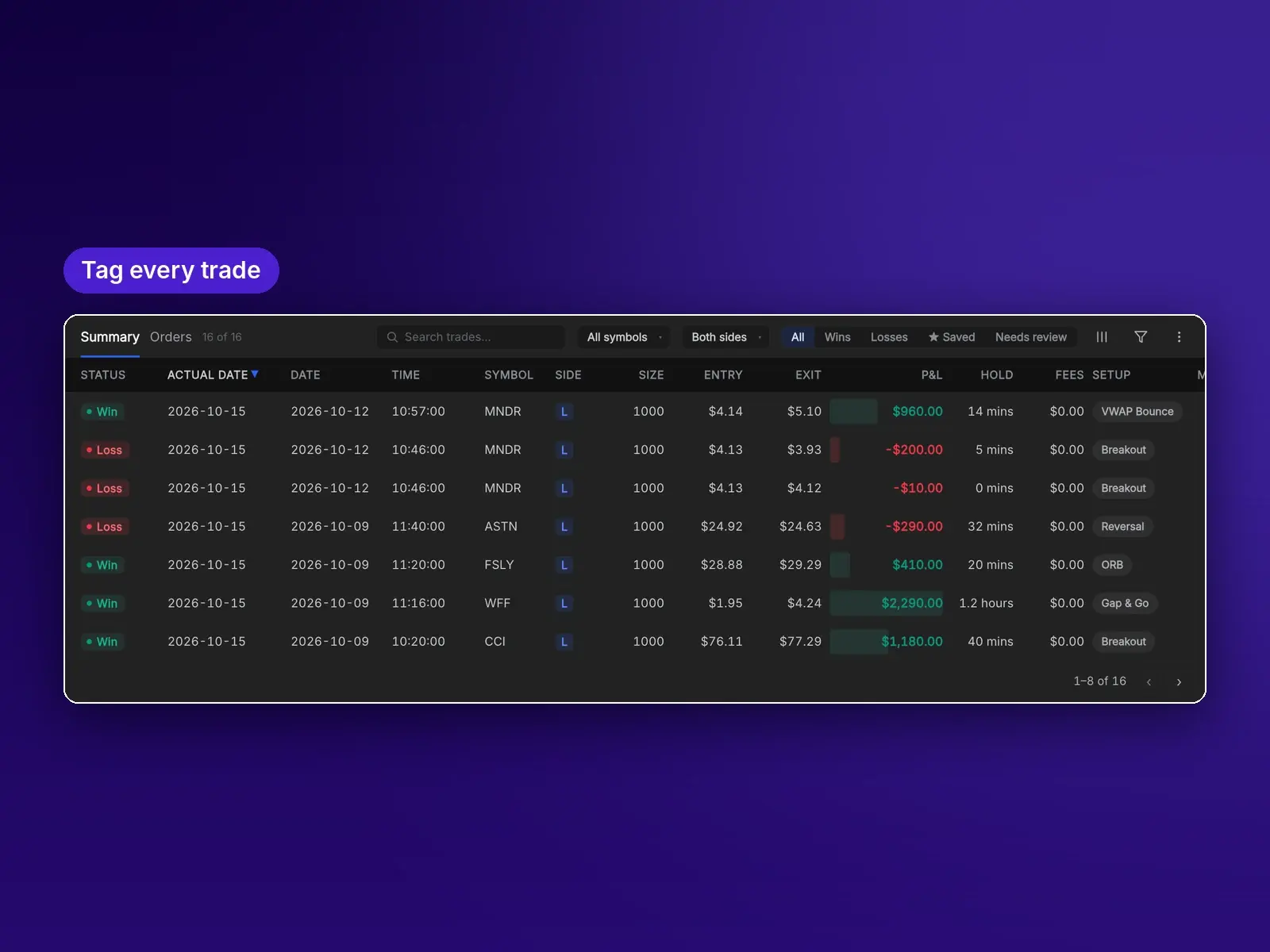
Tag what happened and why
Note the setup, the mistake and the emotion while it's fresh.
- Set your planned stop and see the trade in R.
- Tags for setup, mistake and emotion.
- Captured the best available move? You'll see the percentage.
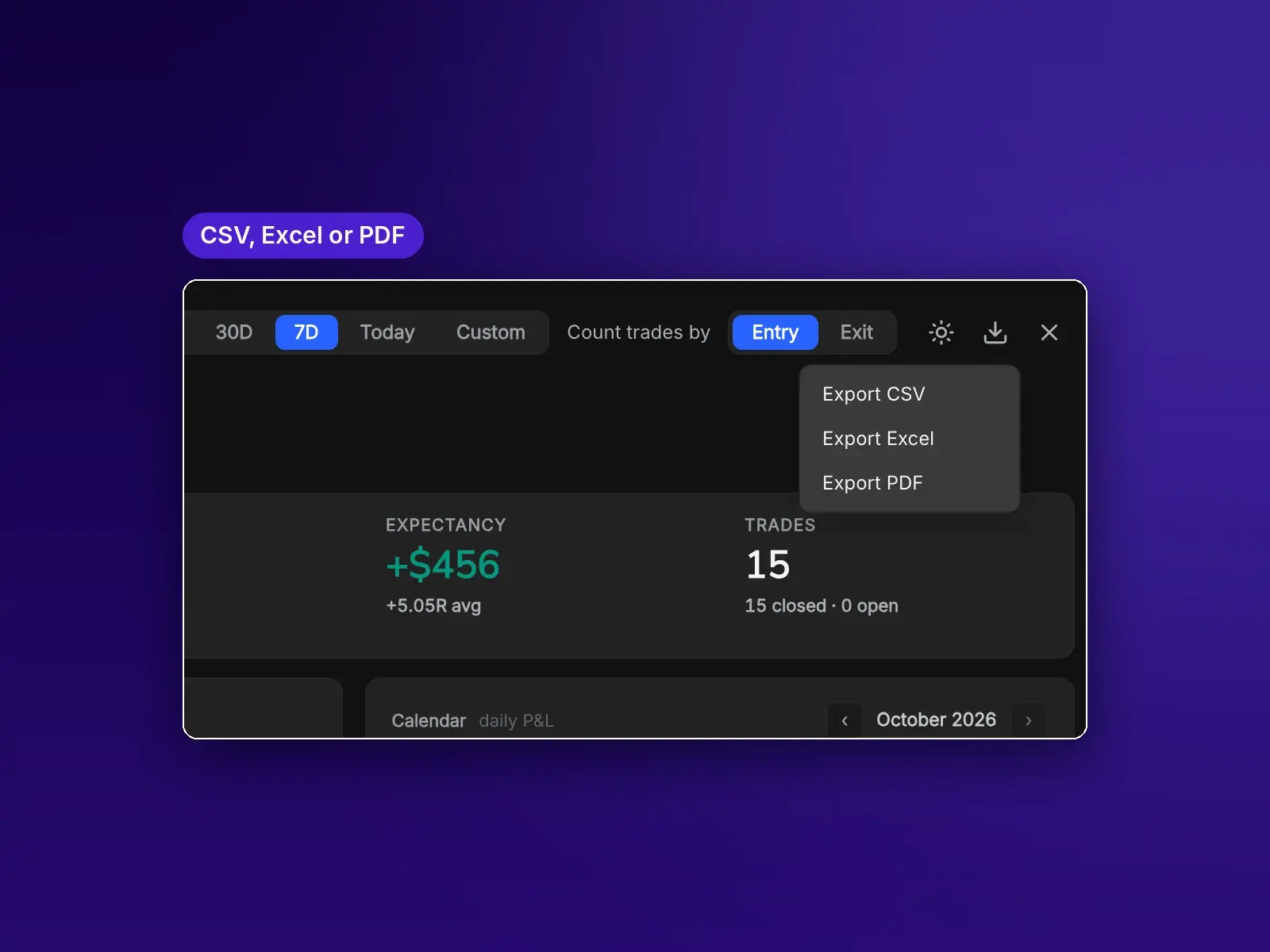
Take your numbers anywhere
Download your trades for your own analysis.
- CSV, Excel or PDF for any date range.
- Every trade's P&L net of fees and contract size.
- Your journal follows you to any computer.
Professional tools, built in rather than bolted on.
Every chart tool steps forward with the replay and never draws from bars you haven't reached yet.
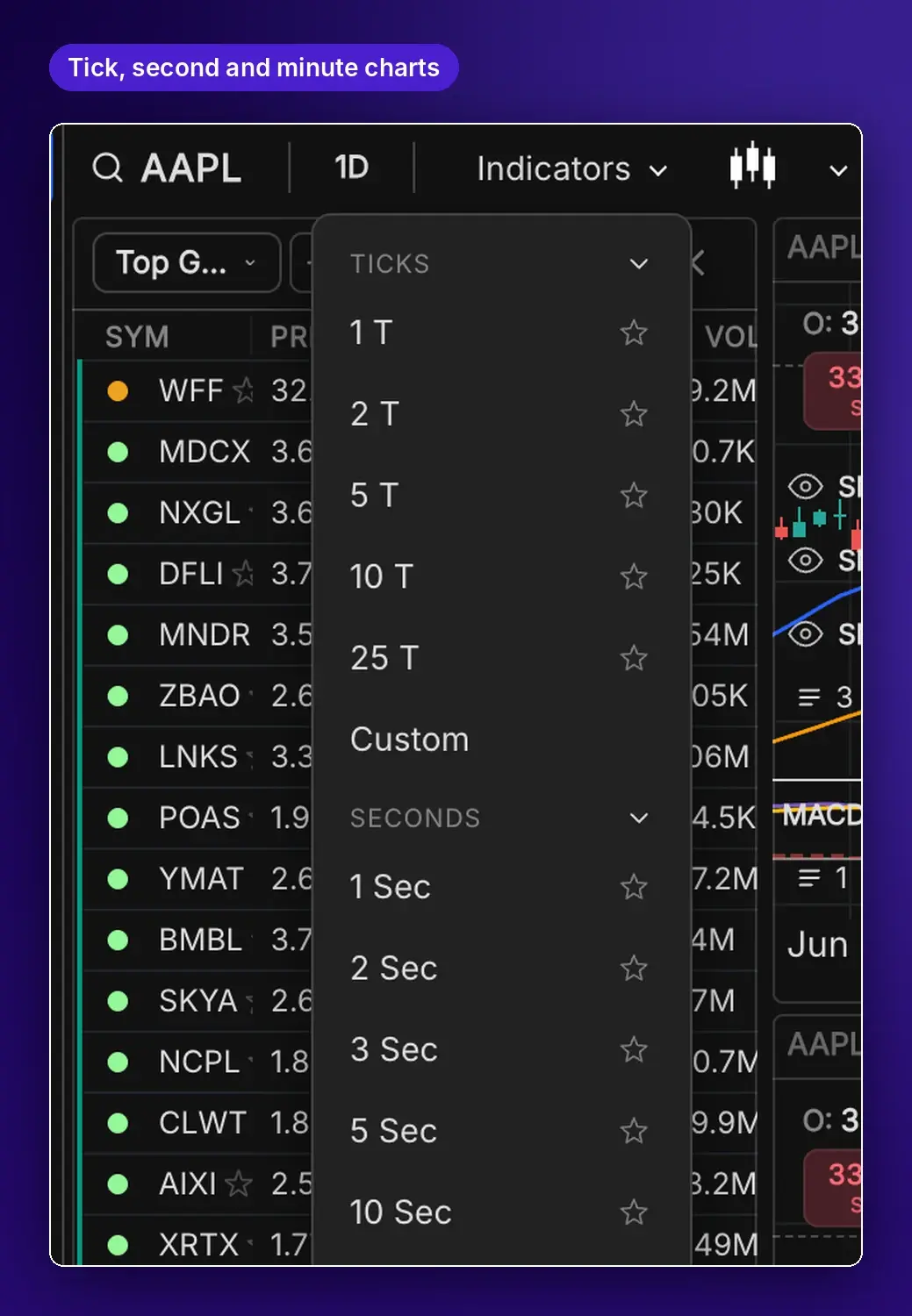
Any timeframe, typed right on the chart
Tick, second and minute presets, or your own interval. Just start typing on the chart.
- Type a custom timeframe directly on the chart, like 3 minutes or 45 seconds.
- Presets for tick charts from 1 to 25 ticks and second charts from 1 to 30 seconds.
- Tick and second charts are part of Premium.
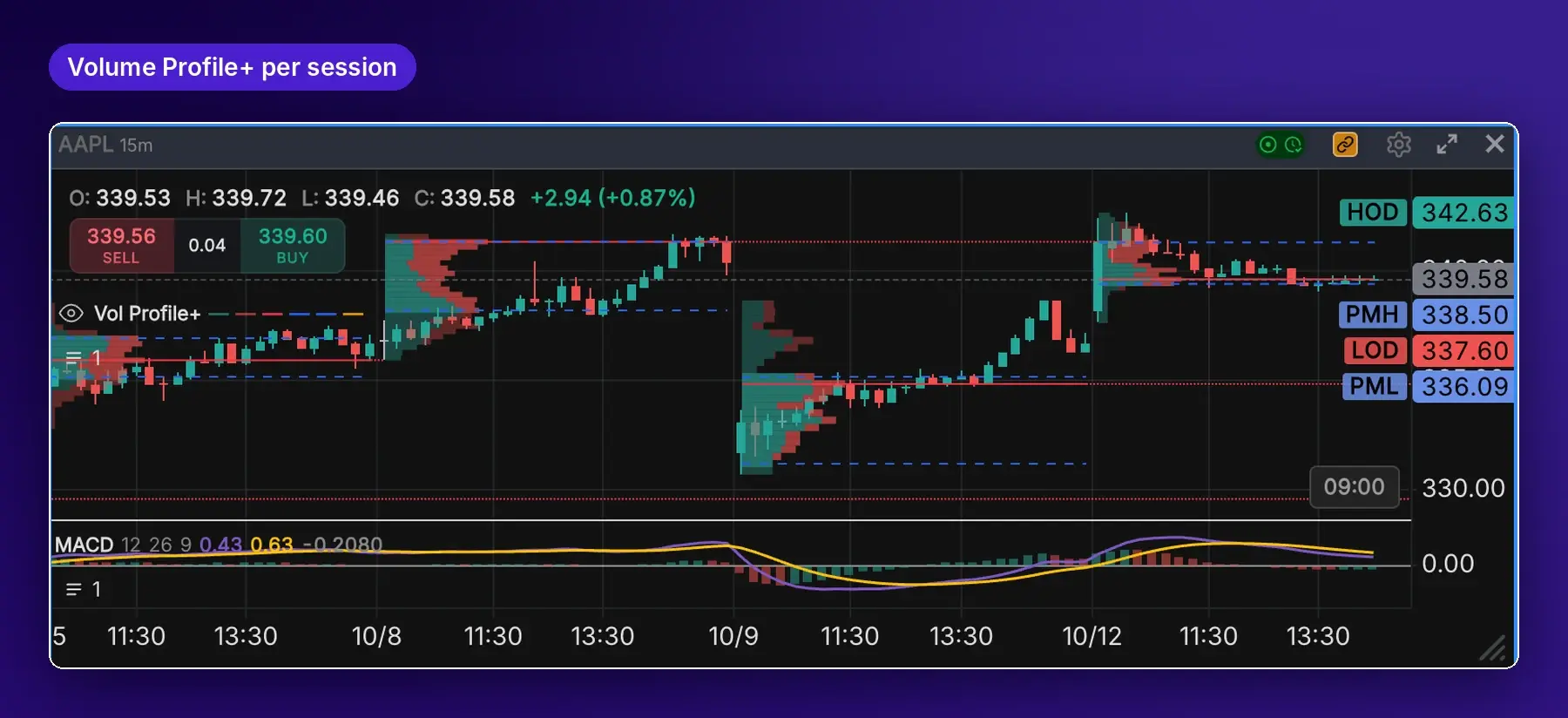
See where the volume traded
Per session or the visible range.
- Point of control, value area and naked POCs.
- Up versus down volume in every row.
- Set the row count to your style.
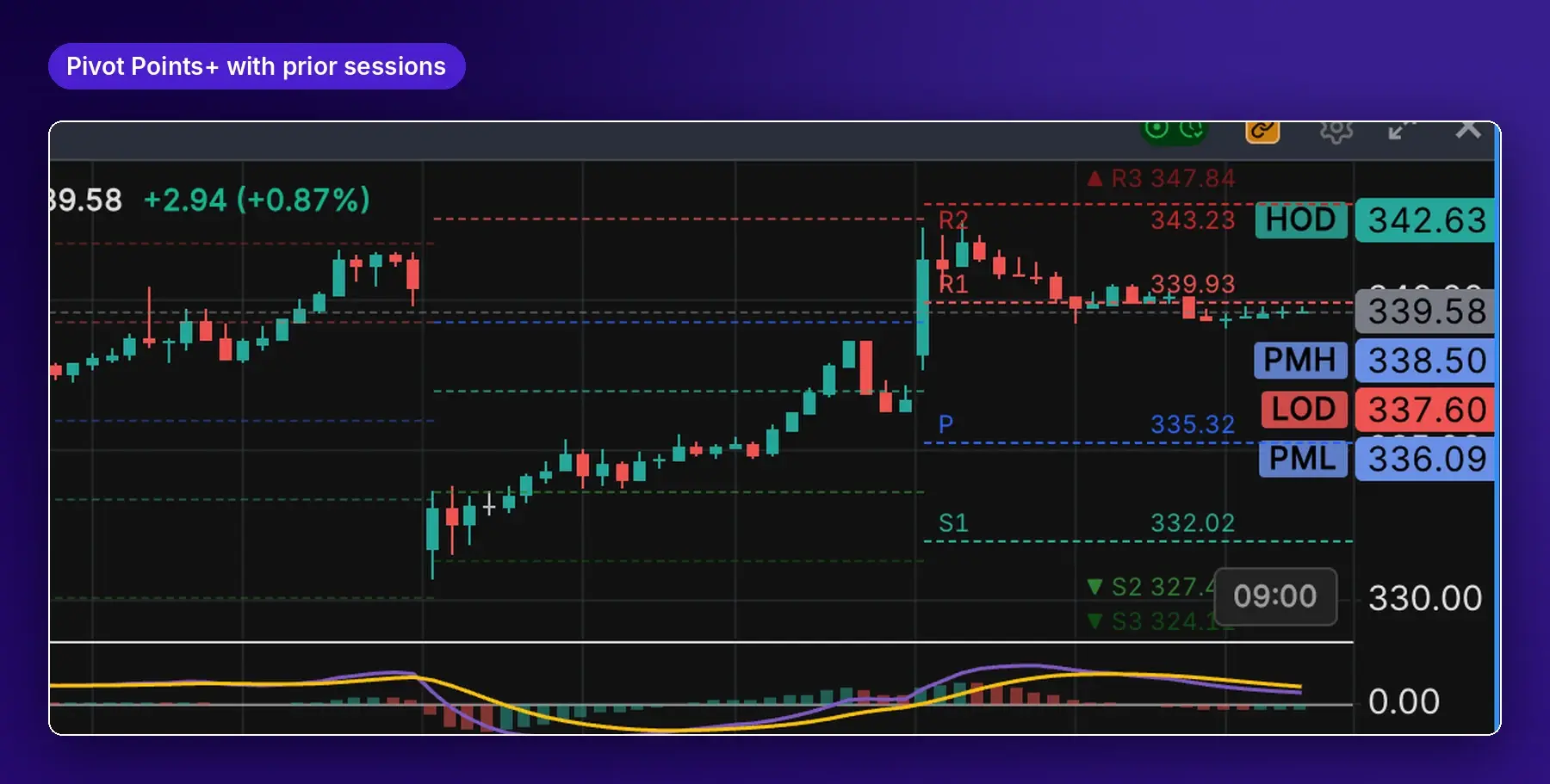
Daily pivots that stay honest
Levels from the prior session, accurate as you scrub and rewind.
- Traditional, Fibonacci, Classic or Camarilla.
- Earlier sessions shown as a dimmed staircase.
- Each level labeled with its name and price.
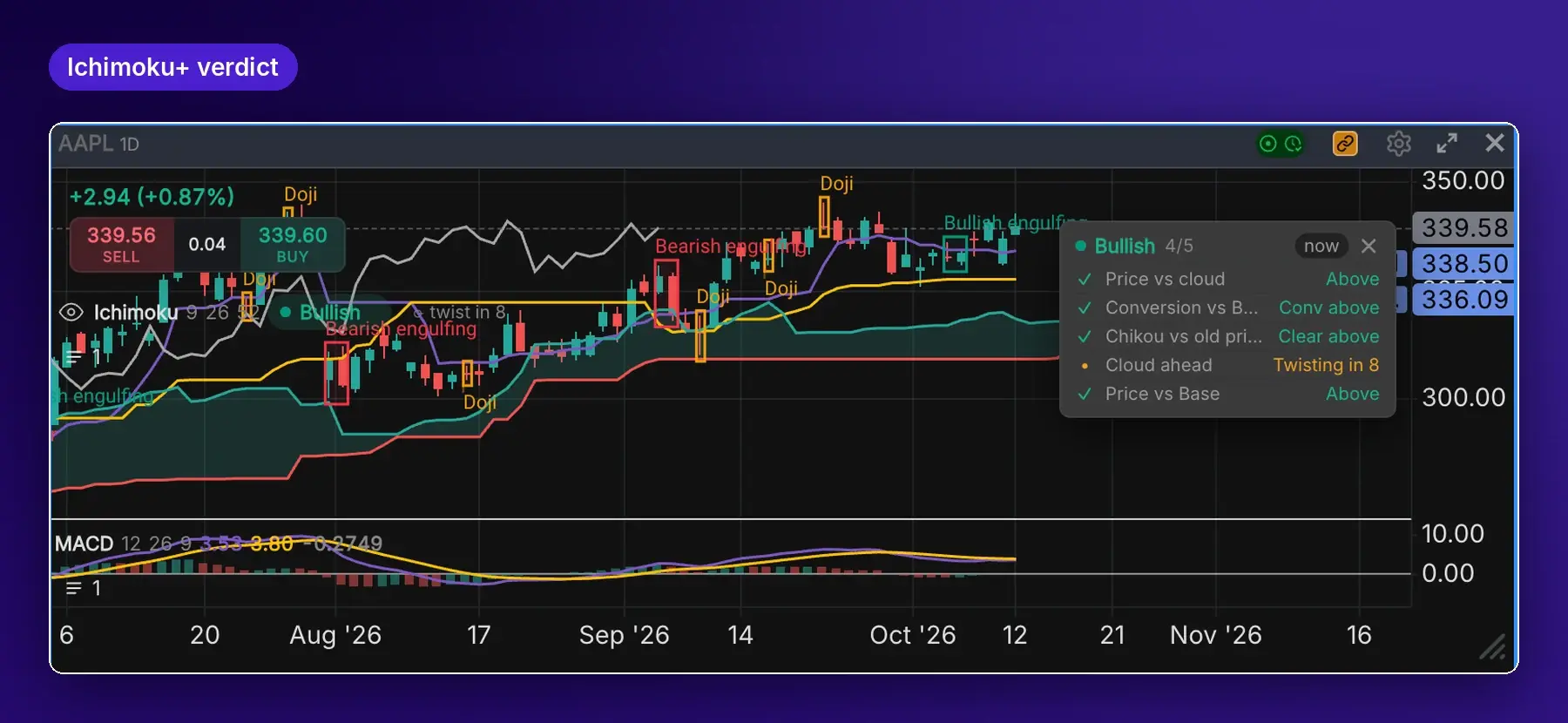
Ichimoku you can read at a glance
A one-word verdict built from five checks.
- Presets: Just the Cloud, Standard or Full.
- See the next cloud twist coming.
- Teach mode explains each check with your chart's numbers.
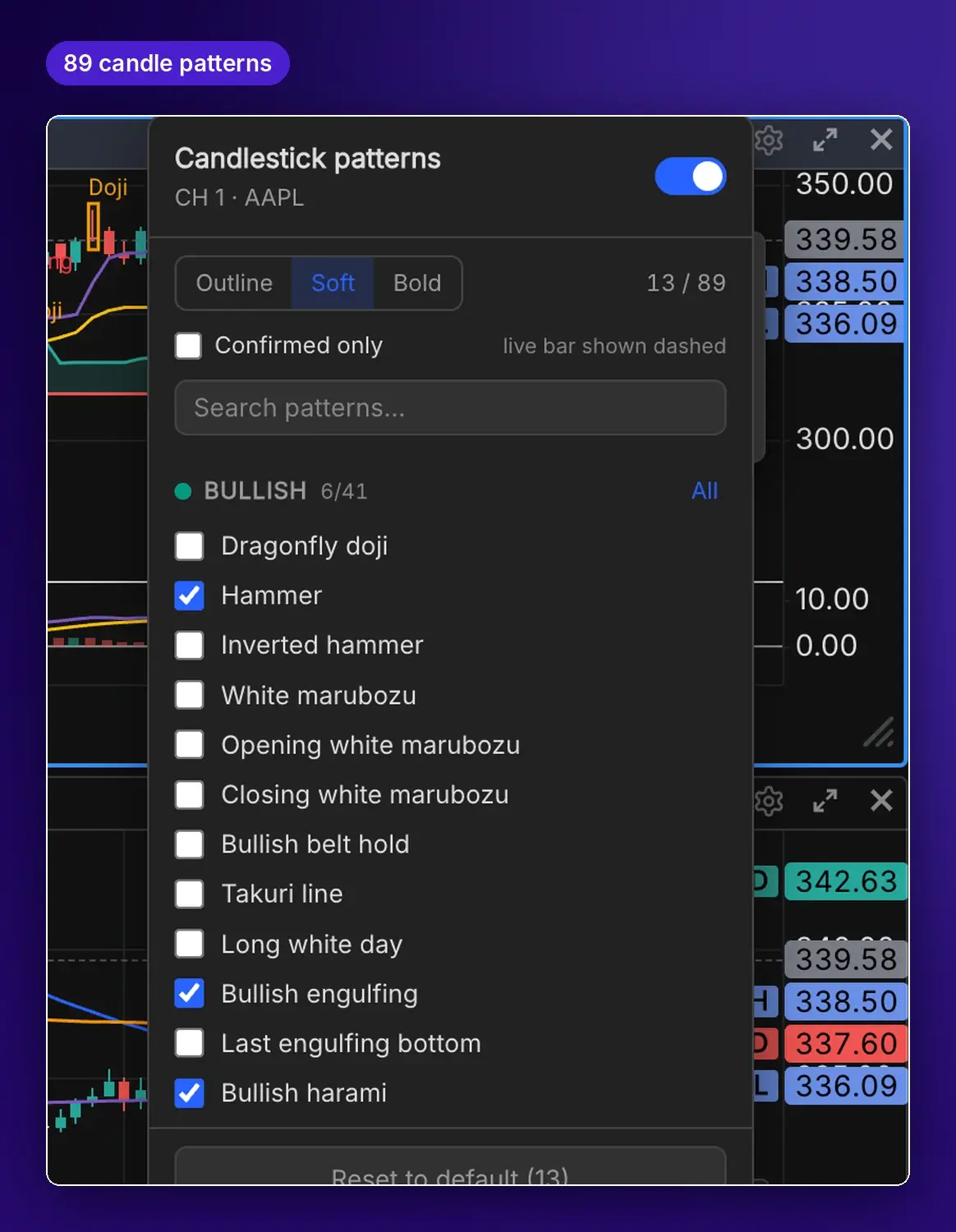
89 patterns, spotted as you study
Automatic recognition from one to five bars.
- Marked on closed bars with labeled boxes.
- Filter by bullish, bearish or indecision.
- Shapes follow textbook rules you can check.
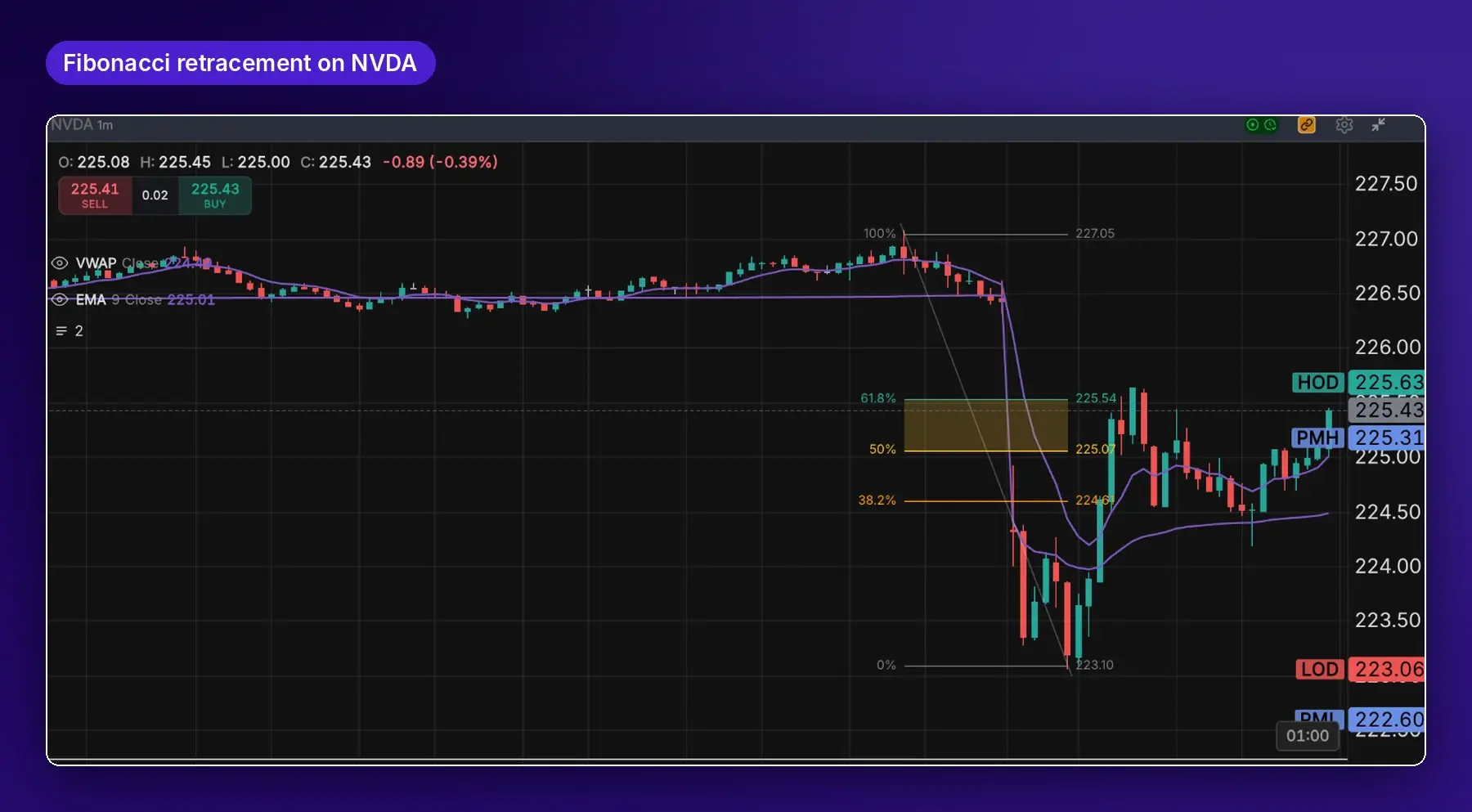
Fibonacci, drawn in two clicks
Retracements with labeled levels and prices, plus the full Fibonacci and Gann set.
- Retracement, extension, arc, fan and time zone. Gann fan, XABCD and Elliott Wave too.
- Per-level styling with a shaded golden zone.
- Drawings sync across charts and travel with your templates.
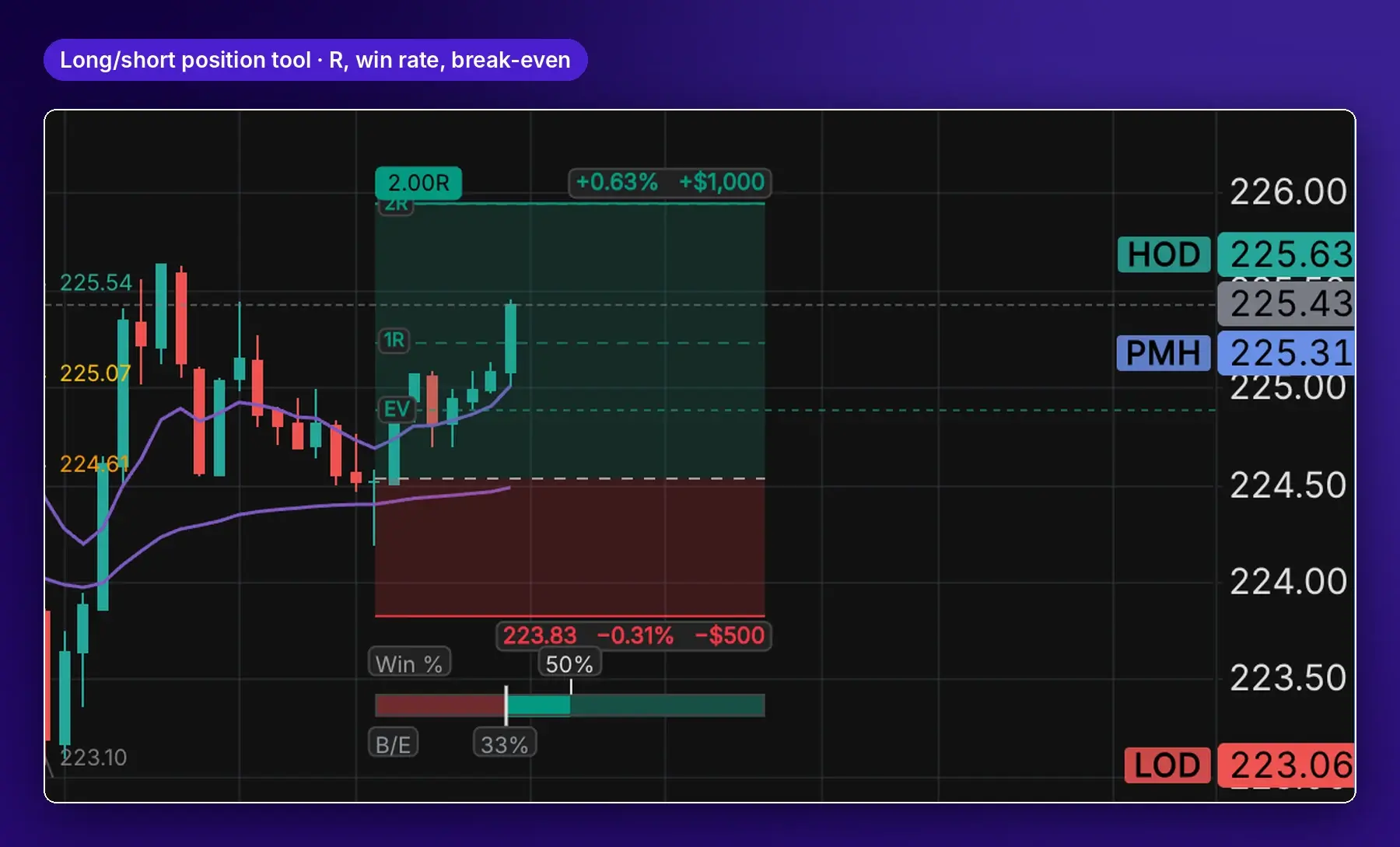
Plan the trade before you take it
Long and short position tools show the math on the chart.
- Reward-to-risk with 1R and 2R marks and dollar outcomes.
- Win rate needed to break even beside your expected win rate.
- Expected value line, so you can check your assumptions.
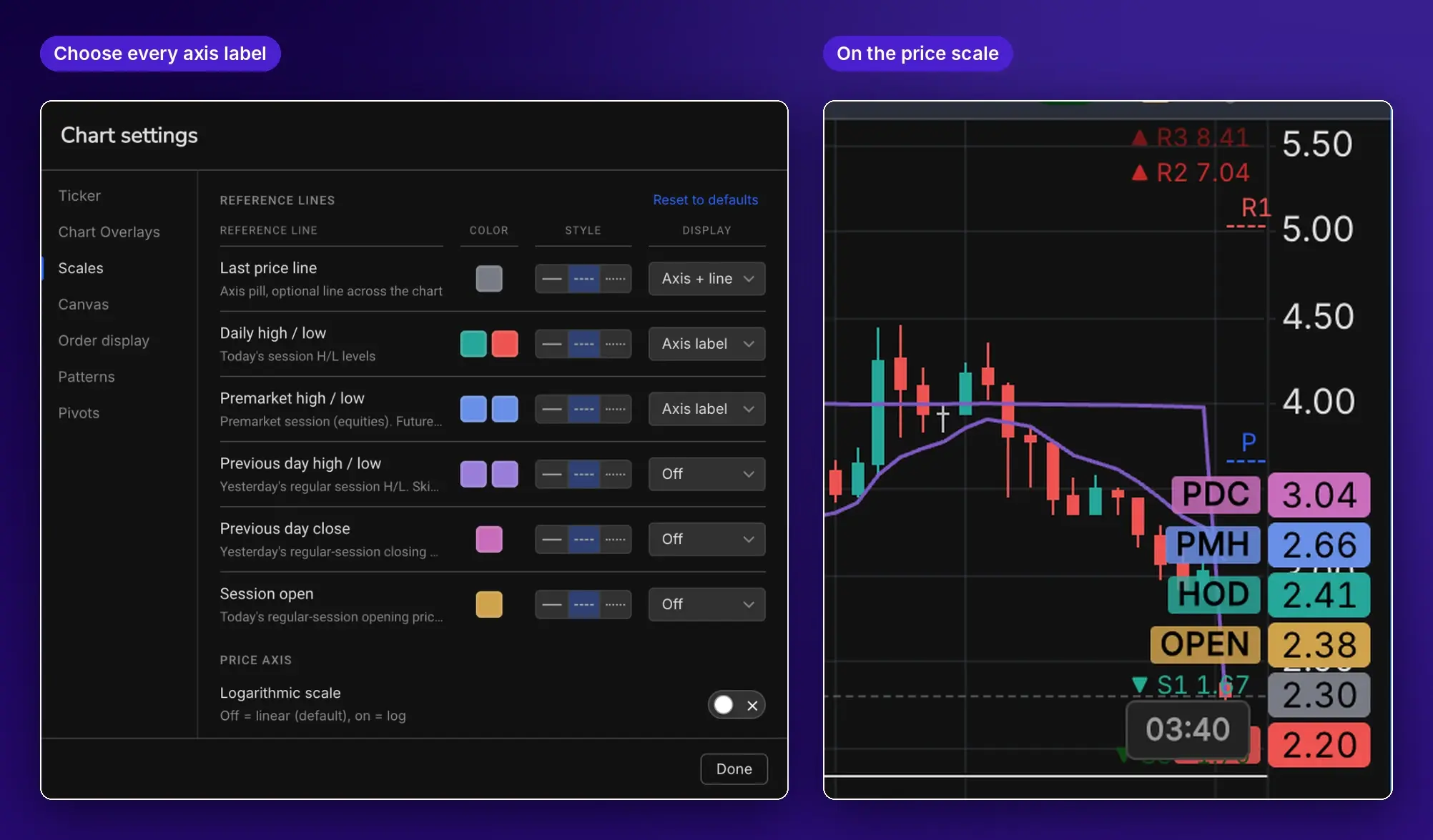
Every key level on the price axis
Choose which reference levels appear and how.
- Last price, daily and premarket high/low, previous day high/low and close, session open.
- Each one off, line only, axis label, or both, in your color and line style.
- Log or linear scale, and small, medium or large axis text.
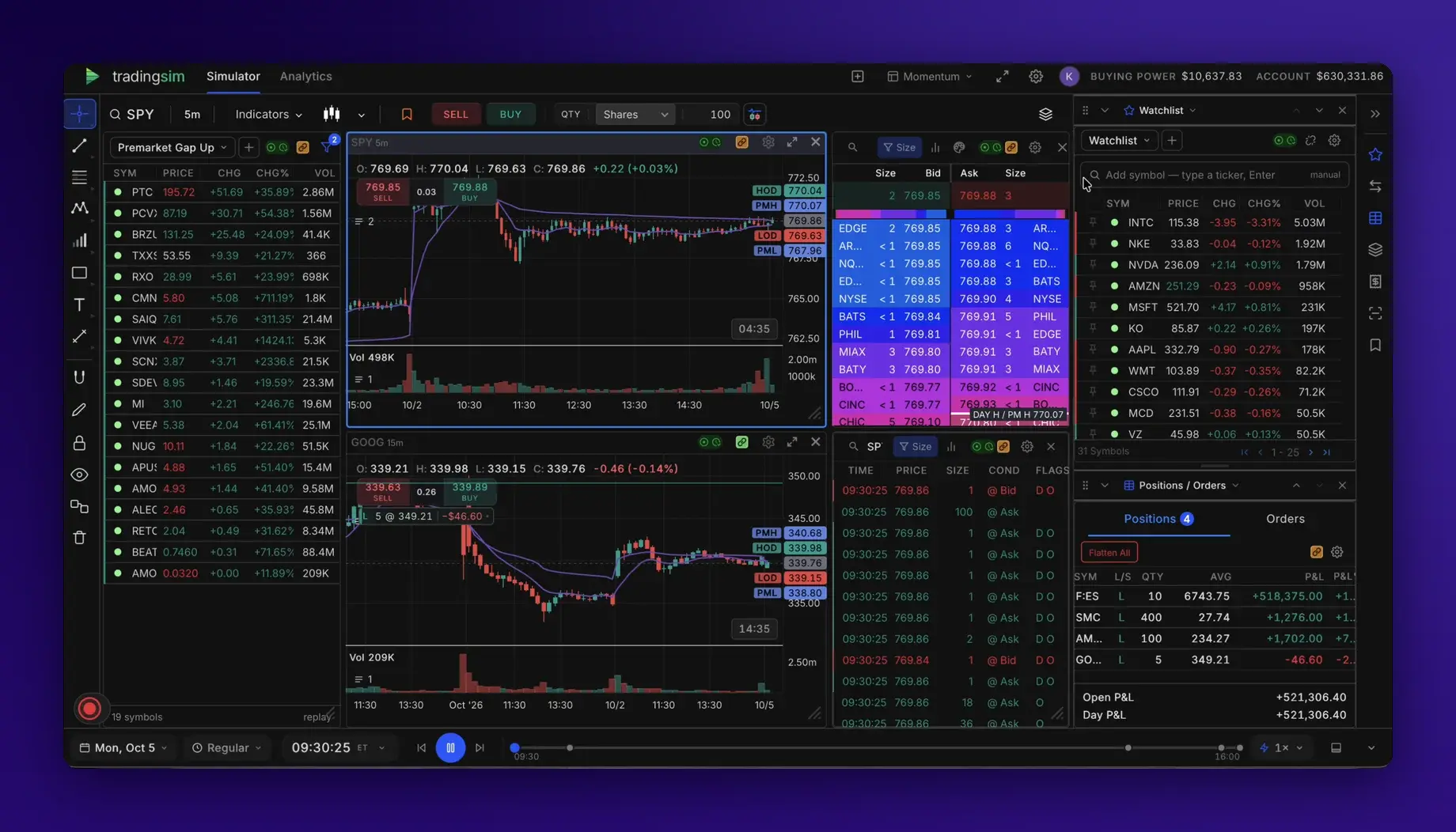
Build your desk any way you trade
Add any panel, then drag and resize it anywhere. No other replay simulator or trading journal we've reviewed lets you build your own grid like this.
- Charts, Level 2, Time & Sales, the scanner, watchlists, positions and the order ticket can go anywhere, at any size.
- As many charts in one workspace as you want.
- Save and name multiple workspaces and chart templates, and switch between them in a click.
- Fullscreen mode when you want nothing but the market.
- Or start from a ready-made layout: Momentum, Scalper or Swing Review.
One product. One clock. Everything a day trader practices with.
The most complete practice platform for day traders
Compared with the kinds of tools traders use today.
| TradingSim Delux | Journals with replay add-ons | Chart-replay tools | Broker-platform replay | Live paper simulators | |
|---|---|---|---|---|---|
| Replay past US stock sessions | ✓ up to 7+ years | Varies by tier | Mostly forex and futures | ✓ with an account and download | Market hours only |
| Time & Sales in replay | ✓ every plan | Top tier only | Not offered | Varies | Live only |
| Level 2 in replay | ✓ Premium | Top tier only | Not offered | Some | Live only |
| Scanner that shows that minute's movers | ✓ every plan | Rare, top tier | Not offered | Not documented | Live only |
| Fills from the bid/ask and real prints | ✓ | Varies | Bar-based | Varies | Live quotes |
| Fees and futures margin | ✓ | Varies | Some | Varies | Some |
| Practice trades journaled automatically | ✓ with MFE/MAE and tags | ✓ live trades need broker sync | Session stats only | Not offered | Basic metrics |
| Runs in your browser | ✓ | ✓ | ✓ | Mostly desktop | ✓ |
Comparison by product category, based on vendors' public pages as of October 2026. Comparing us with a specific tool? See TradingSim vs TraderSync.
Start with the problem you're solving
Preparing for an evaluation
Practice under your own rules as often as you need.
Fees, margin, hotkeys →What Premium adds
Every plan includes replay, the scanner, Time & Sales, on-chart trading and trade analytics.
Level 2
The order book, replayed alongside the tape.
Tick and second charts
For precise entries on fast names.
7+ years of history
Up from 2 years on Pro.
Today's market
Trade the current session on a 15-minute delay.
Everything in Delux
Questions traders ask
How is TradingSim different from a chart replay tool?
Chart replay tools play back candles. TradingSim plays back the scanner, Level 2, Time & Sales and your fills on one clock, so you practice the decisions of the whole day, not just reading a chart.
Which markets can I practice?
Stocks, futures and crypto, about 21,700 symbols. Each follows its own session hours: extended hours for stocks, the Globex day for futures and a 24-hour UTC session for crypto.
How realistic are the fills?
Market orders fill at the best bid or ask at that moment in the replay. Limit and stop orders fill only when historical prints reach your price, and every result is net of the fees you set.
Do I have to import my trades to review them?
No. Every practice trade is logged automatically, with MFE, MAE, R and tags, and you can replay any of them bar by bar.
How far back does the data go?
Pro includes 2 years of market history. Premium includes 7+ years, plus today's session on a 15-minute delay.
Can I try TradingSim before subscribing?
Yes. Start a 7-day free trial and replay your first session in minutes. Start your free trial →